
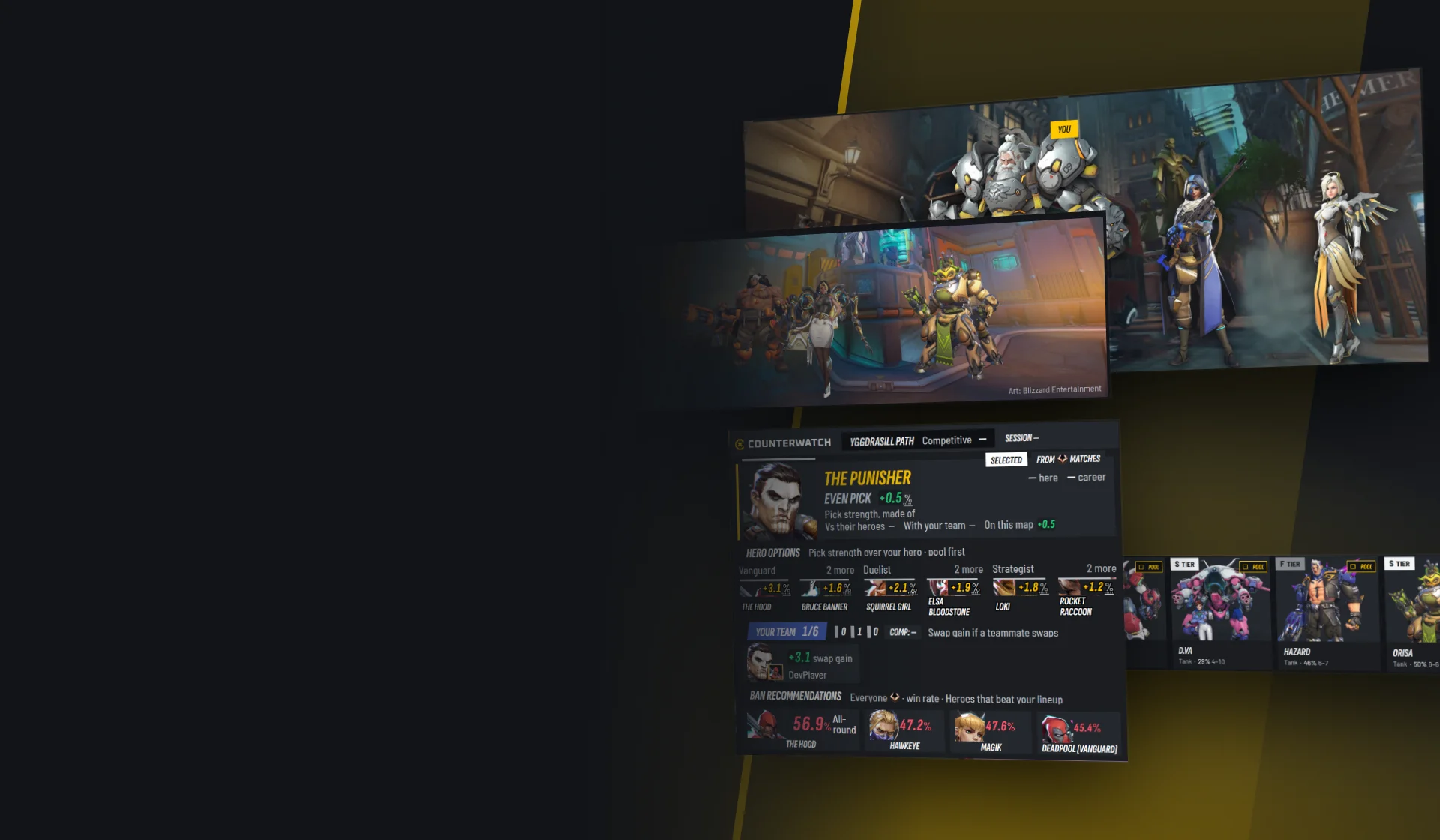
Counterwatch V3 and Counterwatch Standalone come out on November 18
Every screen of Counterwatch is redesigned, the match window rates every player in the lobby, and Counterwatch Standalone arrives for anyone who would rather run it without the Overwolf client. Here is everything that changes.
Counterwatch V3 is a free update. Every window is redrawn, the overlay follows the whole match, the match window now rates everyone in the lobby, not only you, and Profile shows how you trade against each enemy hero. On the same day, Counterwatch Standalone arrives: the same app for anyone who would rather run it without the Overwolf client.
Each part below starts with what changes and a picture. Open More details under it for everything else, or open them all from the contents.
A new look
Every window has a new design: black and gold, a new logo, and pages that lead with the game's art, like the season picture on Home and your team standing on the map after a match. The pages sit in a rail on the left. Drag the handle to see Home before and after.
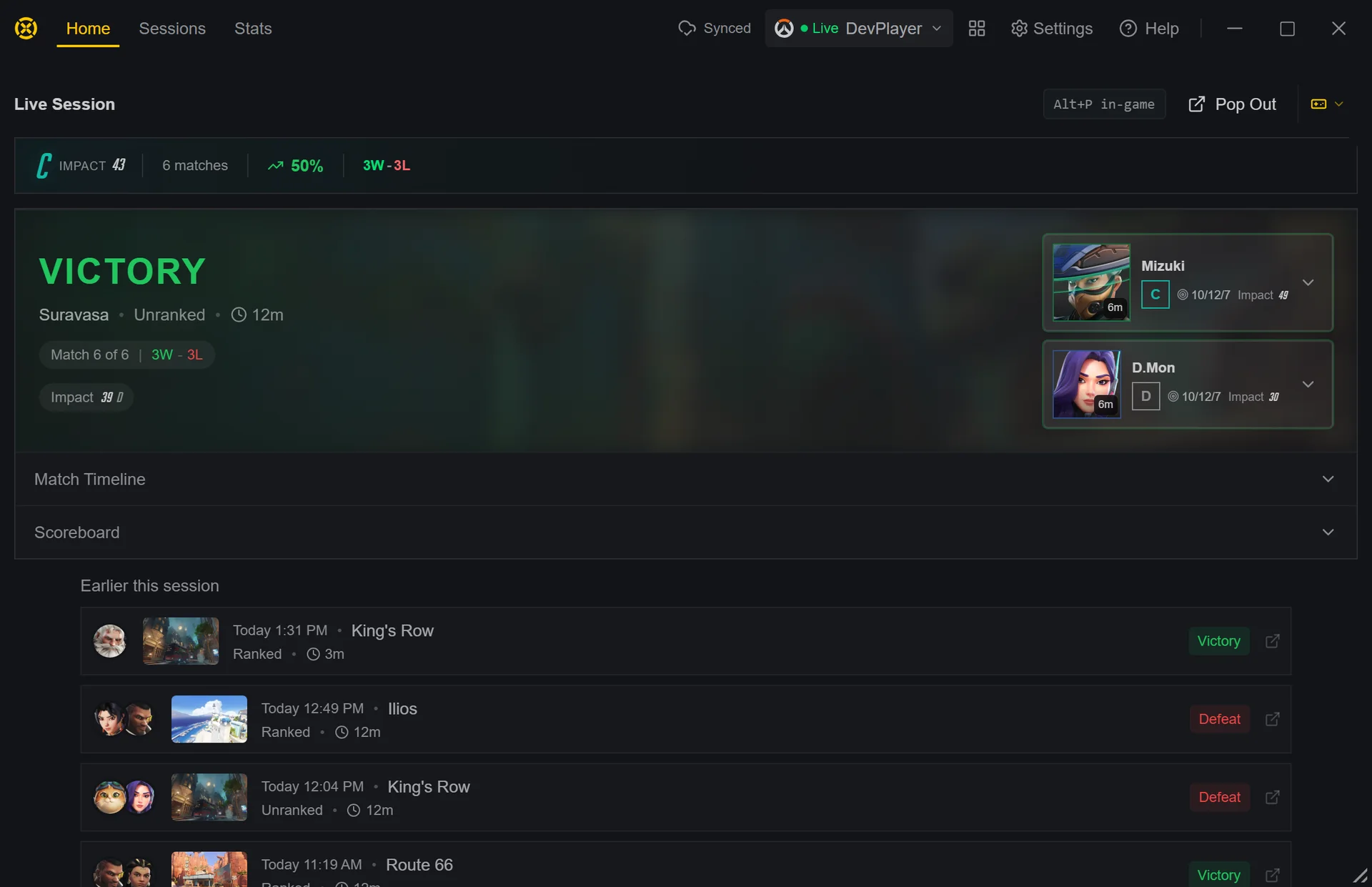 2.x
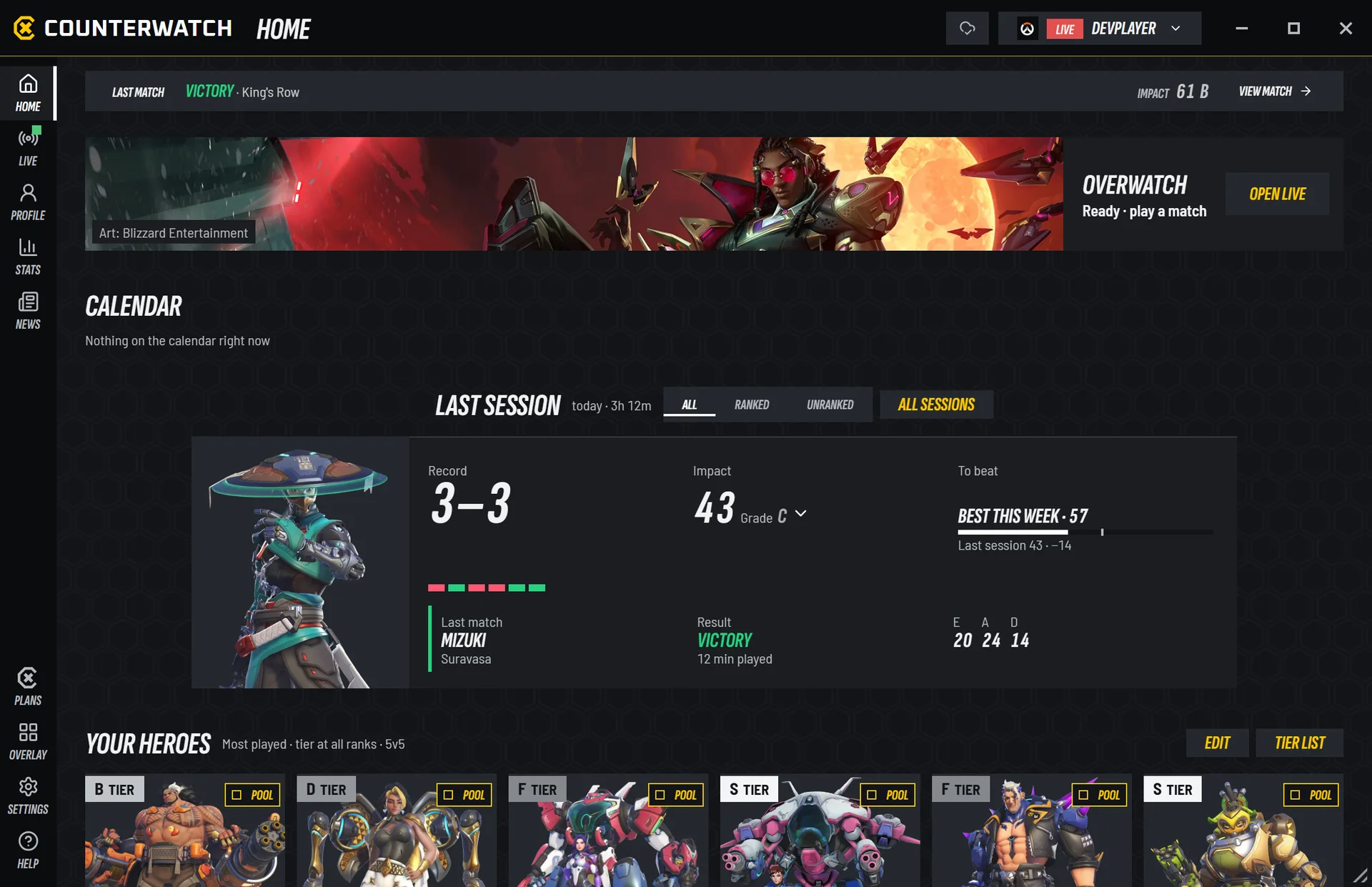 V3
More detailsThe logo, the type, the colours, and where everything is now
What the new design is
- A new logo, the C and X mark, and the name set in a new face.
- New type: a tall italic face for names and figures, and a clear one for sentences.
- Filled blocks instead of gold frames. One gold marks you and the next thing to do.
- Your team and theirs lean in opposite directions, so a side reads by its shape as well as its colour.
- Green, grey and red say how something went. Roles are one grey icon, and a rank is always its icon.
- Pages lead with art: the season picture on Home, your three most played heroes standing in your season on Profile, and your team on the map after every match.
 2.x
 V3
Finding your way
- The rail on the left:
Home,Live,Profile,StatsandNewsat the top,Plans,Overlay,SettingsandHelpat the bottom. On a wide window each icon gets its name. - The title bar names the page you are on and holds
Start, which says what the game is doing (Waiting for Battle.net,Launching,Overwatch is live), the sync mark and your profile. - The launcher moves with your session. It opens Live when a match starts and goes back to Home once the session is over. It never leaves Settings, Help, Plans or a page you are reading.
- On every other page, a strip shows the match you are in, or your last match with
View match.
When, and how to get it early
V3 reaches every player on . Restart Counterwatch to get it. Counterwatch Standalone goes up on the download page at the same moment. Your matches, hero pool, player notes, settings and overlay layout come with you.
I'll stream the launch on the Counterwatch Discord from : a walk through the new app and your questions, then V3 goes live during the stream.
(21:00 GMT)
Restart Counterwatch once it is out.
The launch, then Counterwatch news and occasional offers, by email. No account needed.
Already subscribed? Your price does not change, at the launch or at any renewal: the new Premium price is for subscriptions started after V3 comes out.
The launch discount covers a new subscription to Plus or Premium, until . Early access is Premium's alone: Plus gets V3 with everyone else, at the same price, with the same perks.
More detailsWhat each plan has, how the price works, and the way back from early access
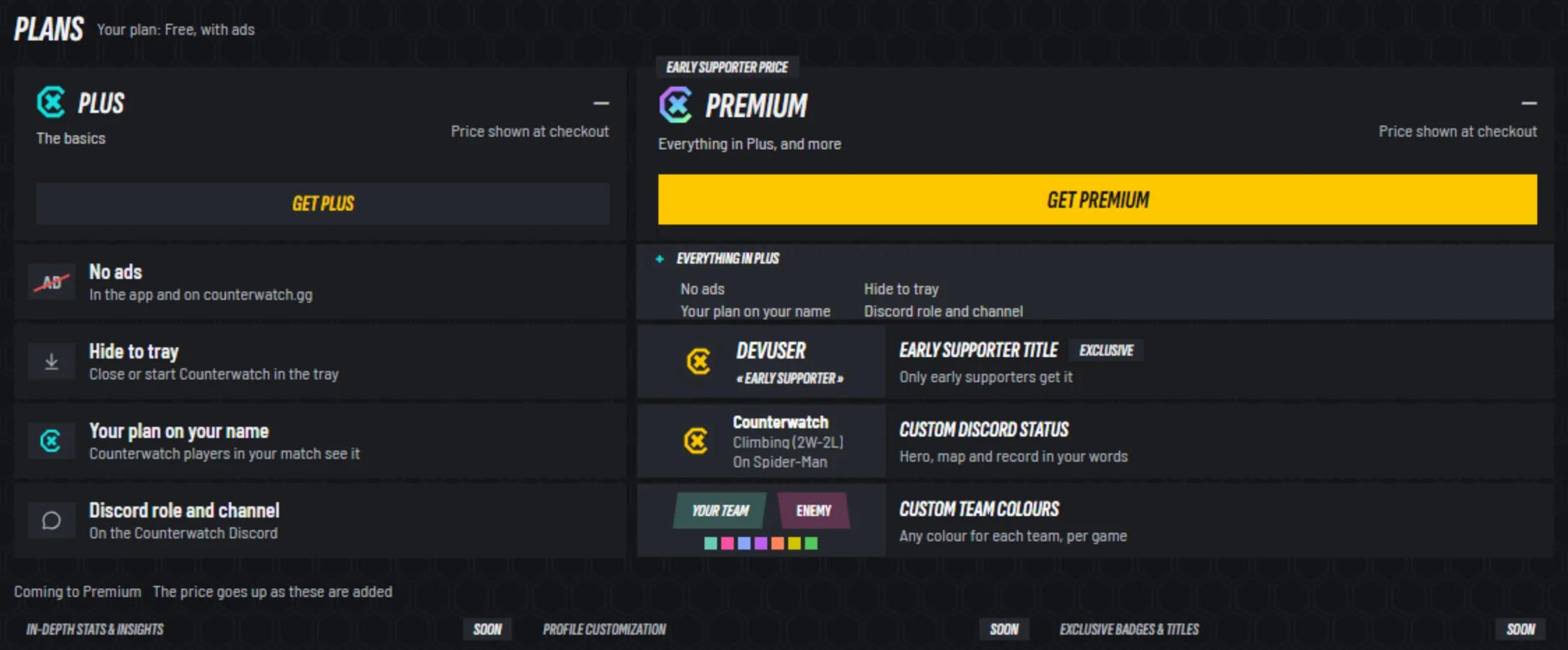
- 1Plus: no ads in the app or on counterwatch.gg, hide to tray, your plan on your name and the Discord role
- 2Premium: everything in Plus, and more
- 3The Early Supporter title: last chance before V3 comes out
- 4Your own Discord status
- 5Custom team colours, new with V3
Premium
- Everything in Plus.
- Custom team colours, new with V3: any colour for your team and the enemy's, per game, in Settings →
Overlay→Team colours. Anyone can preview them. - Your own Discord status: in V3 you design a card for each moment,
Between matches,Role selectin Overwatch,In matchandCasualin Marvel Rivals. Anyone can try the designer; the cards reach Discord with Premium. - The Early Supporter title, yours for good if you subscribe before V3 comes out on . It is not given after that.
- Your Premium mark beside your name, which V3 also shows on the overlay to other Counterwatch players in your match.
- V3 six days early: from , turn it on from the top of Home. The way back to the old version is in Settings →
Advanced.
Plus
- No ads in the app or on counterwatch.gg, hide to tray, the Discord role and channel, and the Plus mark on your name.
- Plus gets V3 with everyone else, at the same price, with the same perks.
The price
- Premium's price goes up when V3 comes out on , for new subscriptions only. The standard price on the day you subscribe stays yours on every renewal, so nothing changes for anyone subscribed by then: you keep the price you have.
- The launch discount takes 50% off the first month, or 15% off the first year, of a new subscription to either plan, with no code to enter, until . Renewals are at the plan's standard price. A Premium subscription started after V3 comes out gets the discount off the new price.
- In V3, Plans is a page in the launcher:
MonthlyorYearly, both plans side by side, and once you subscribe,Your planwithChange planandBilling.
Counterwatch Standalone
Counterwatch Standalone is a second way to run Counterwatch: the same app, without the Overwolf client running. The Overwolf version stays, so pick whichever you prefer. Sign in with the same account and your matches, hero pool, player notes, overlay layout, plan and most settings are there. The overlay and Alt+C, which opens Live and the overlay editor over the game, work in both.
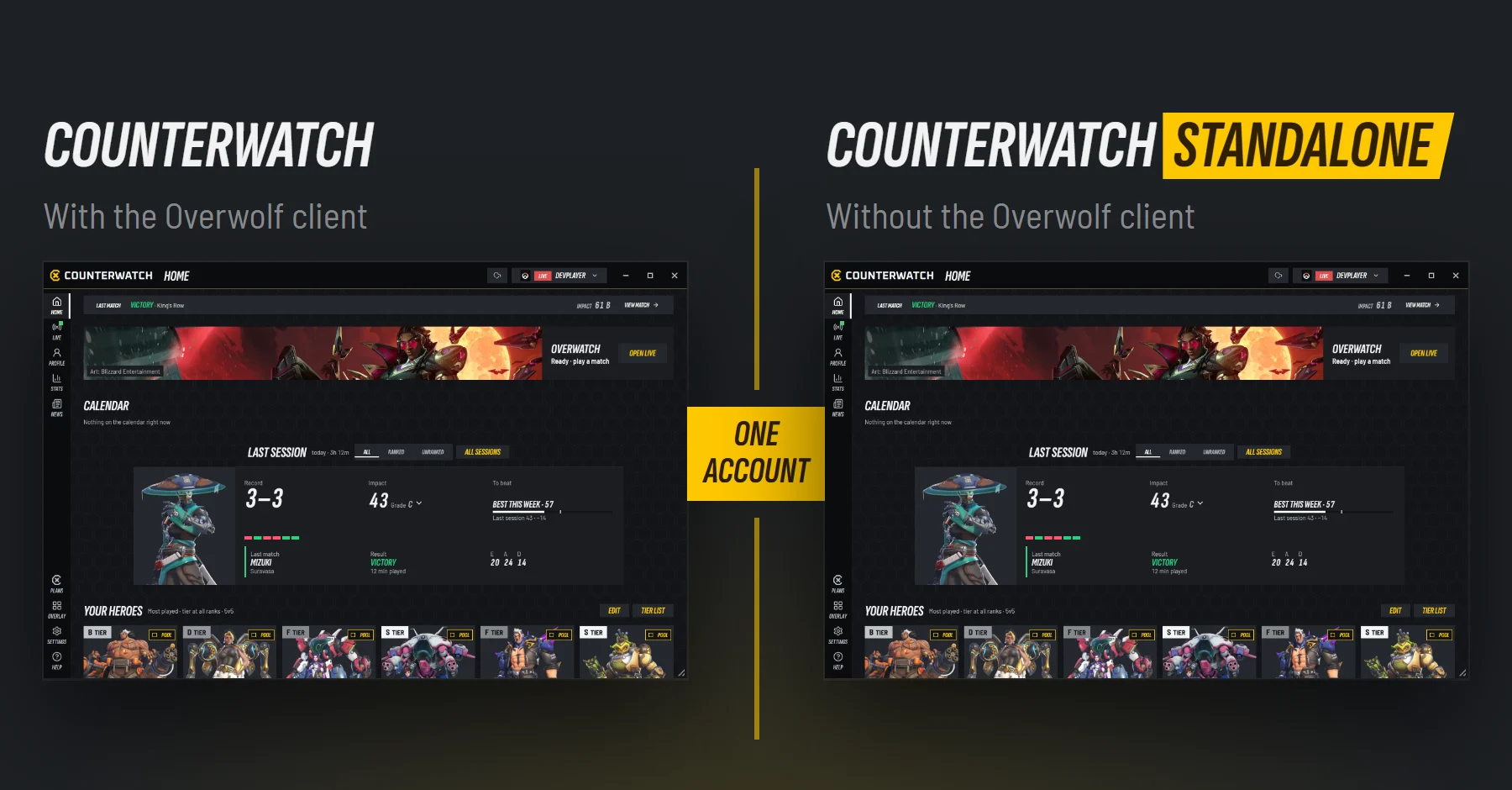
More detailsWhat comes with you, what you set again, and how to switch
- What it is: Counterwatch built on ow-electron. It installs through Overwolf's installer, but you do not need the Overwolf client open to use it.
- What your account brings: your match history, hero pool, player notes, settings, overlay layout and your Plus or Premium plan.
- What you set again: hotkeys, window positions, the text size, OLED protection, what closing does and when the Live popout opens. A match's fights stay on the PC that recorded it.
- Switching: sign in to the Overwolf version first, so your matches are in your account, then install Counterwatch Standalone and sign in. Both can stay installed, but run one at a time: while the Overwolf version runs, Counterwatch Standalone leaves the match to it, and both say so.
- Start it before you play, or let it start with Windows: no Overwolf client opens it when a game starts.
- A guest's history stays in the Overwolf version, because it lives only on that PC. Sign in before you switch, and it comes with you.
- Closing to the tray is for everyone on Counterwatch Standalone, not only Plus.
- In-game menu:
Alt+Copens Live and the overlay editor over the game in both versions. - Where: the download page, from .
During a match
Counterwatch follows a match in two places: the overlay, over the game, and Live, in the launcher or in its own window beside the game. In both, once the match is under way, a hero that answers the enemy doing the damage scores higher.
The overlay now follows the whole match: a briefing at hero select, your notes and every player's Impact around the scoreboard, your live Impact while you play, and a debrief between rounds. Alt+C opens Live and the overlay editor over the game, without alt-tabbing.
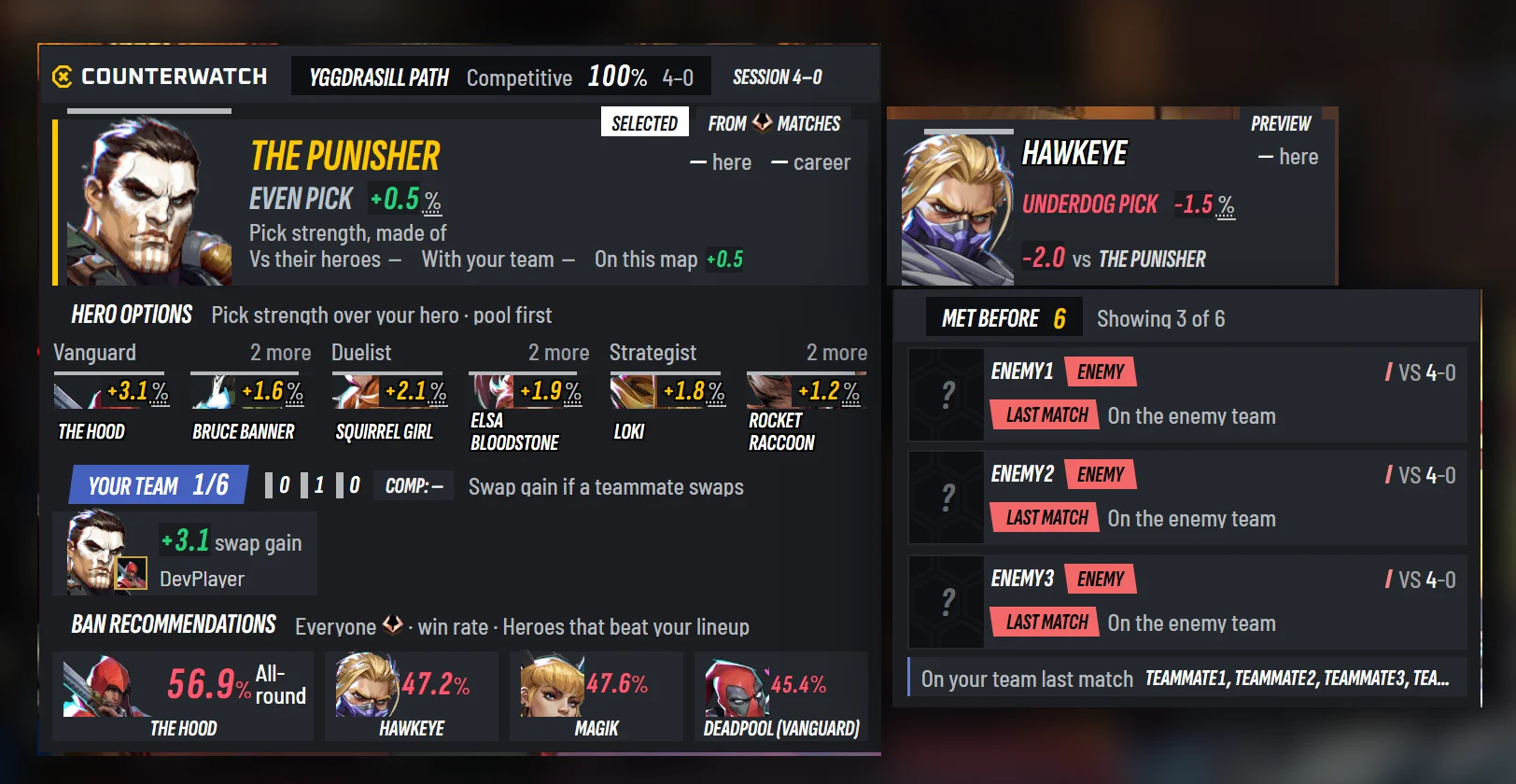
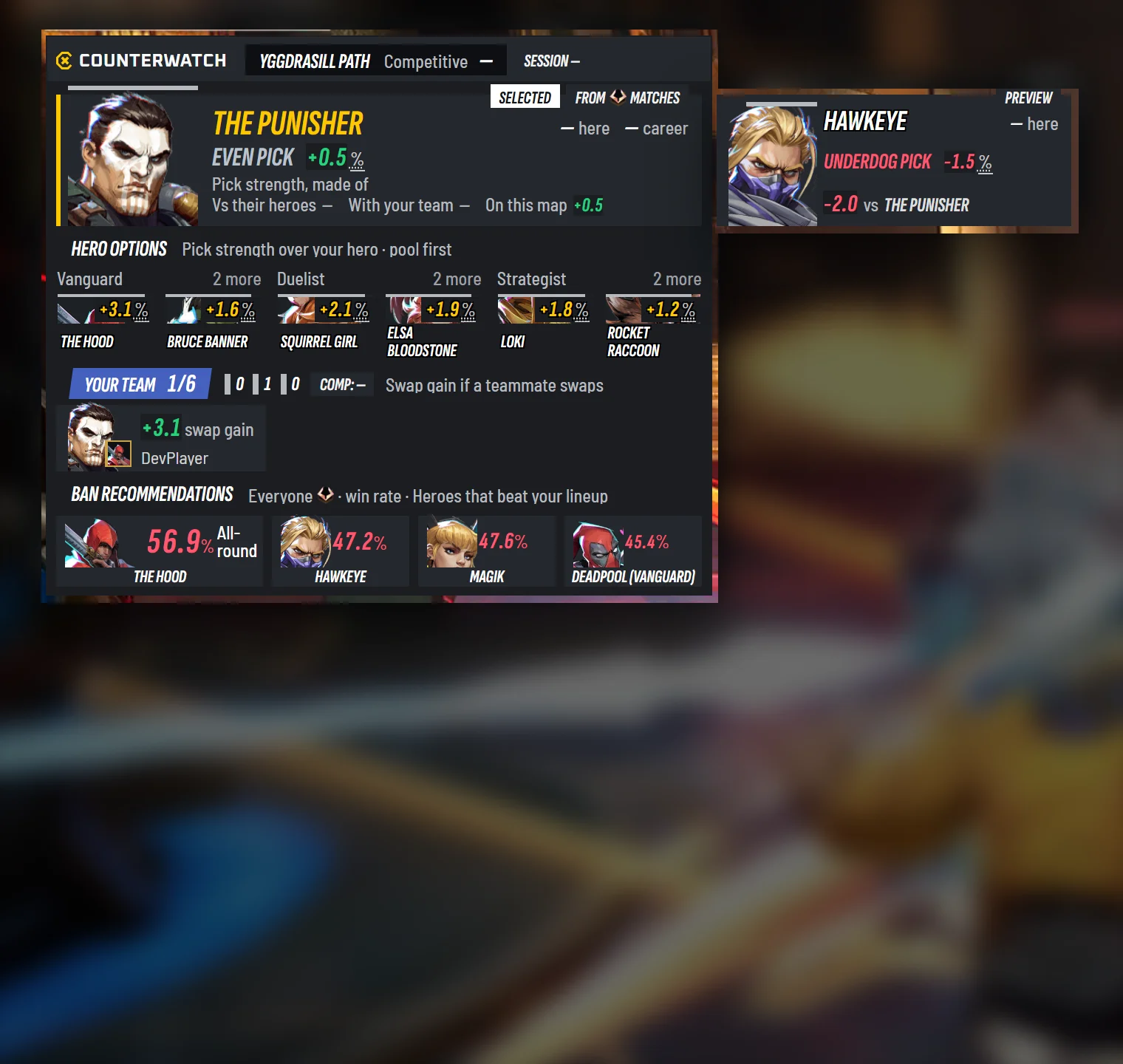
- 1The map, the queue, your record there, and your session
- 2Your pick: Favoured, Even or Underdog, and what that is made of
- 3Hero options, by role, your pool first
- 4Your team, and the swap that would help it most
- 5Ban recommendations, in a Marvel Rivals Competitive ban phase
- 6In Marvel Rivals, the hero you hover, against your pick
- 7Met before: players you have a record with, your notes on them, and who was in your last match
The overlayEvery widget, the in-game menu, and the overlay editor
At hero select
The briefing shows your record on the map, the hero you are hovering or have picked with its pick strength (Favoured, Even or Underdog, made of Vs their heroes, With your team and On this map), your hero options, your team's comp and the swaps a teammate could make, then the enemy team, or in a Marvel Rivals Competitive ban phase, the ban recommendations. Beside it, Met before lists the players you have played with or against, your record with them and your notes. Each scene can draw it Full or Brief.
When you hold Tab
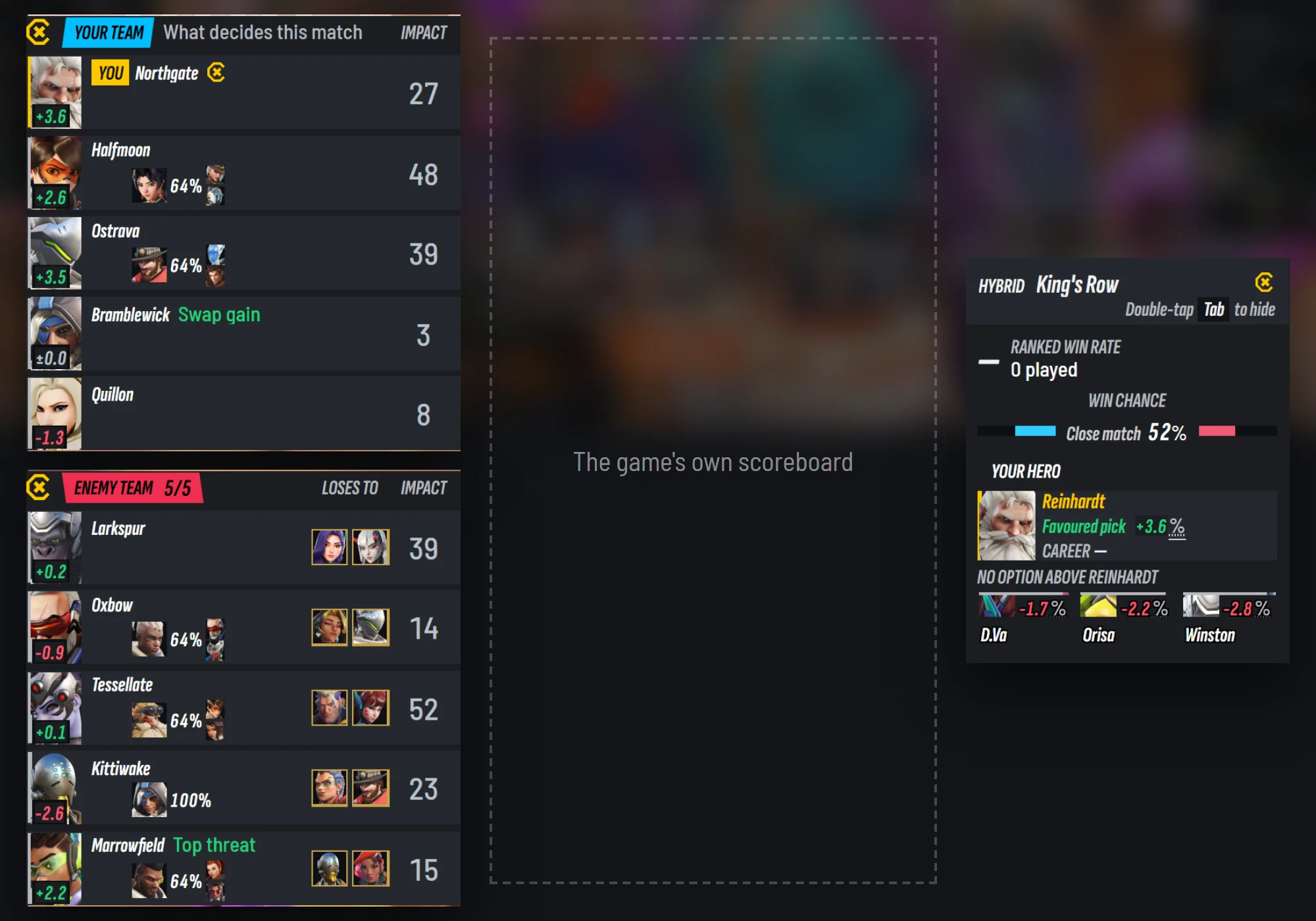
- 1Every player's Impact, live
- 2How strong each player's pick is
- 3Their most played heroes, or your note on them
- 4Callouts: the swap that would gain most, and the top threat
- 5The two heroes each enemy loses to
- 6You: the map, your win rate on it, the win chance and your options
Around the game's own scoreboard, each seat shows the player's rank, their most played heroes or your note on them, your record with them (With 4-2, Vs 1-3), a Last match flag if they were in your last match, their pick and their Impact. Enemies show the two heroes they lose to. Your own plate has the map, your win rate on it and the win chance in words.
While you play
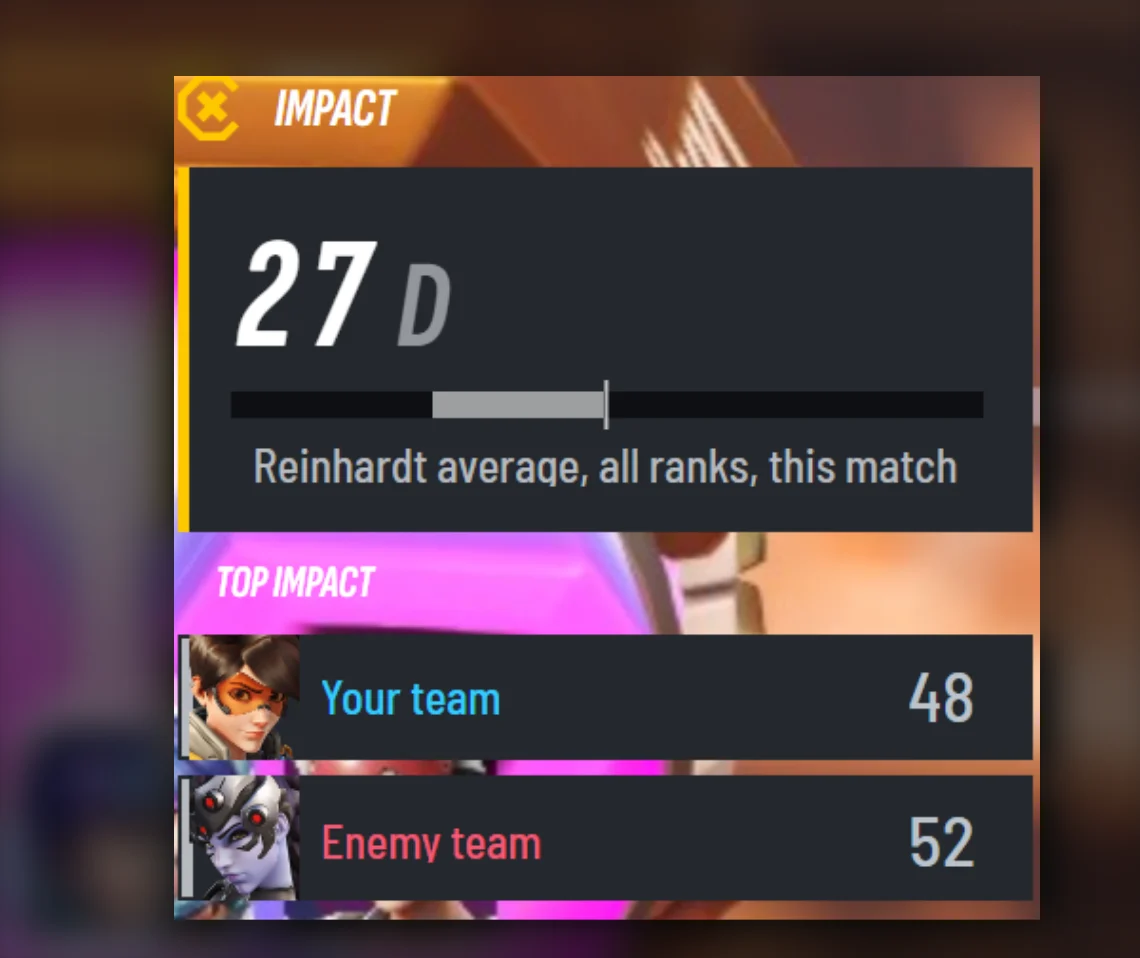
- 1Your Impact this match: 50 is the average player on your hero at your rank
- 2The top Impact on each team
The Impact meter shows your live Impact and the top Impact on each team, by hero portrait. It takes the opening minutes to give a first reading, and a match that is not rated, like a custom game, has none.
Between rounds

- 1Your last round, large, against the match so far
- 2Your pick for the next round, against what they last played
- 3The swap that would gain most
The round debrief shows your last round against the whole match so far, your Impact for the round, how the team's fights went, and on the right your pick for the next round against what the enemy last played, with up to three swaps.
The rest of the overlay
- Roster strips show both teams as portraits with marks: a skull, a respawn timer, a lost connection. A Counterwatch player carries their plan mark, your tile has a gold edge, and the editor can stand them
HorizontalorVertical. - Hero swaps name the team, the new hero large, and who swapped from what.
- Notifications stack where you put them, at most three, with keys drawn as keys. A first-time notice waits until you are out of a fight.
- Hero picks weigh the enemy doing the damage. Once a match is under way, a hero that answers an enemy at Impact 90 scores higher than one that answers an enemy at Impact 10.
Alt+C: Counterwatch over the game
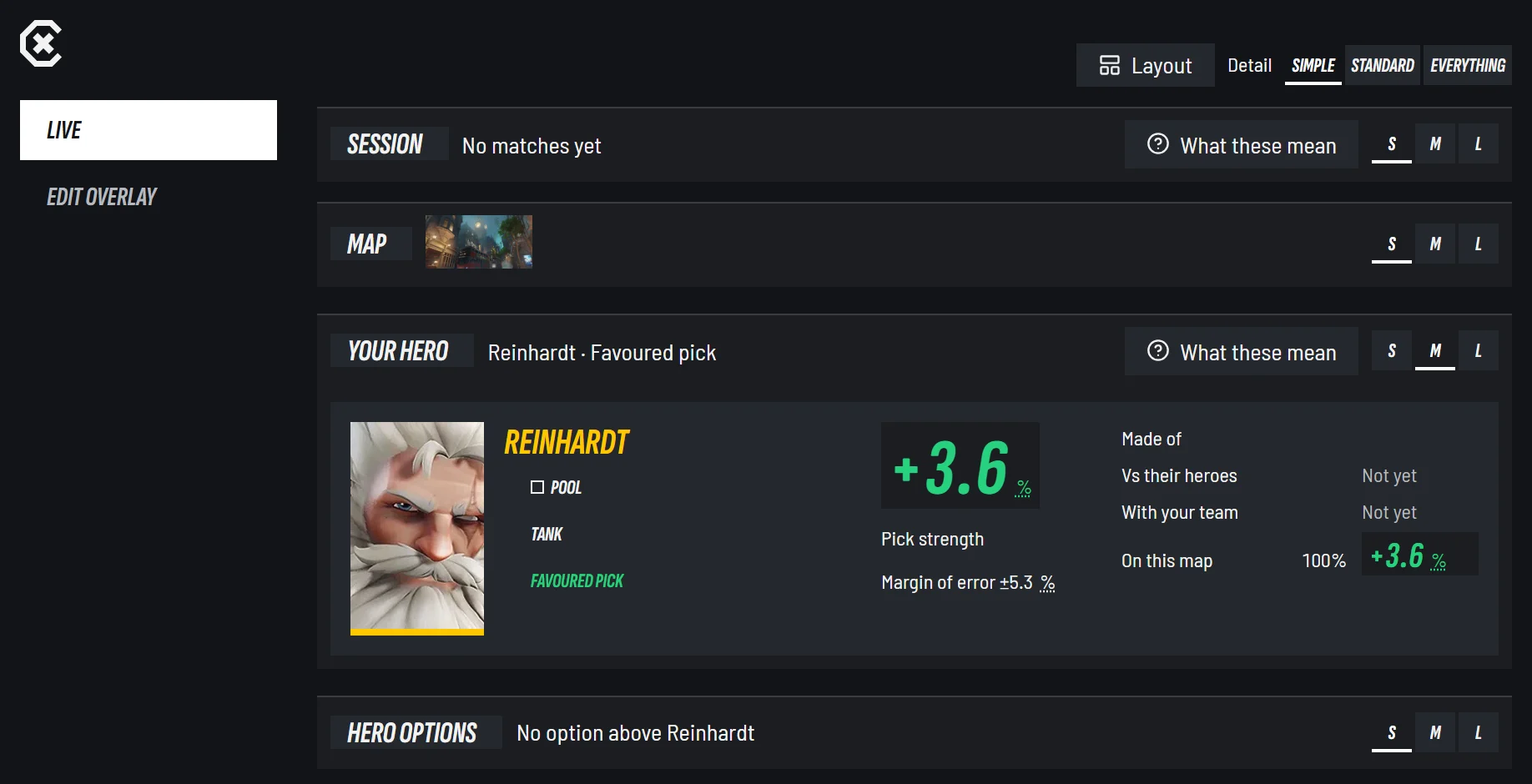
- 1Live and the overlay editor over the game, and back to it
Press Alt+C in game to open Live or edit the overlay over the game, without alt-tabbing. If the game cannot hand it your keys and mouse, the press says what to change.
The overlay editor
- A fourth scene,
Between Rounds, for the round debrief. - The new widgets are in the list, and each one scales from 50% to 150%.
- Share your layout:
Share→Copy codegives a code for your friend, andPaste a layout codeuses theirs. It holds where each widget sits and its size, not your team colours.
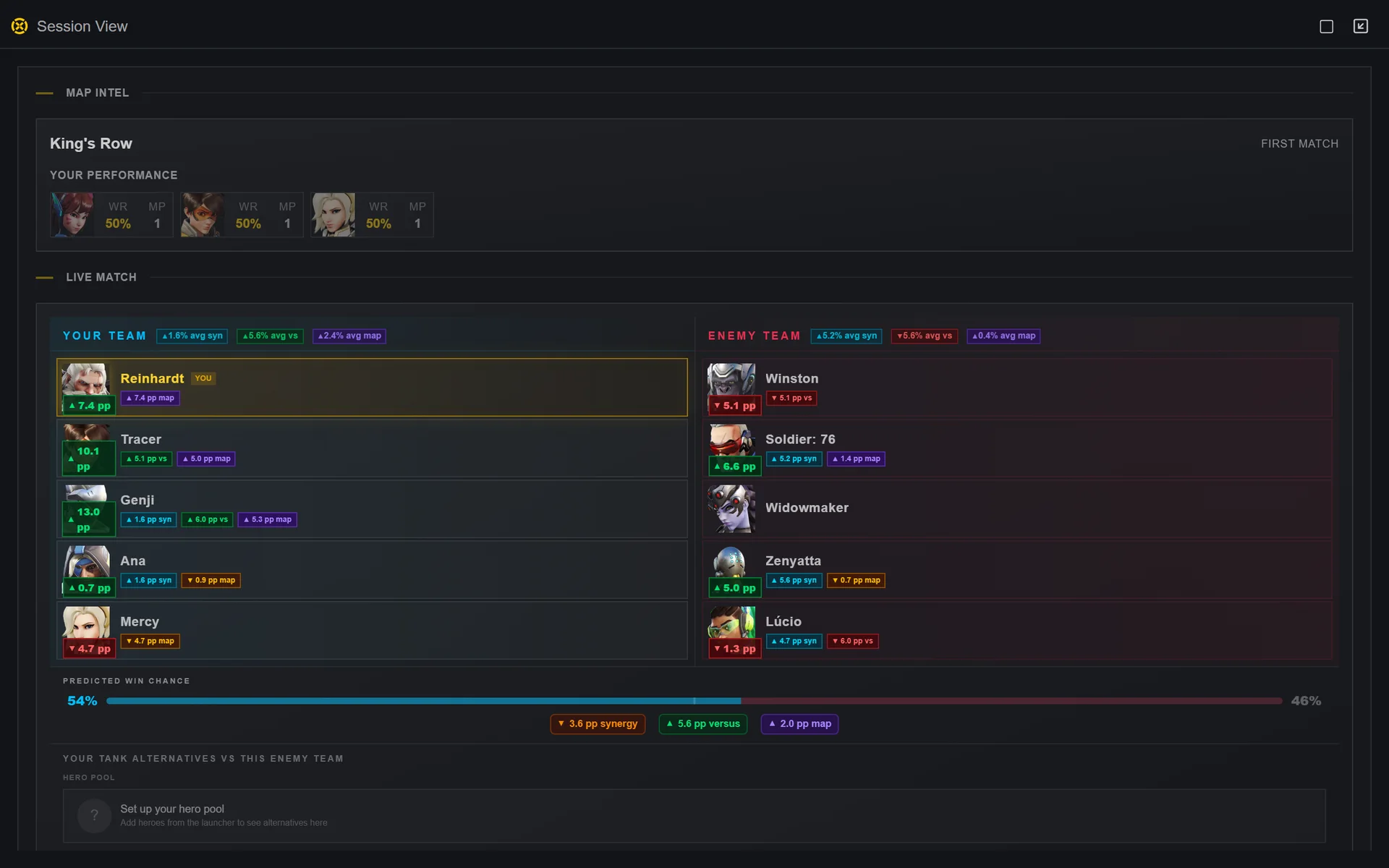
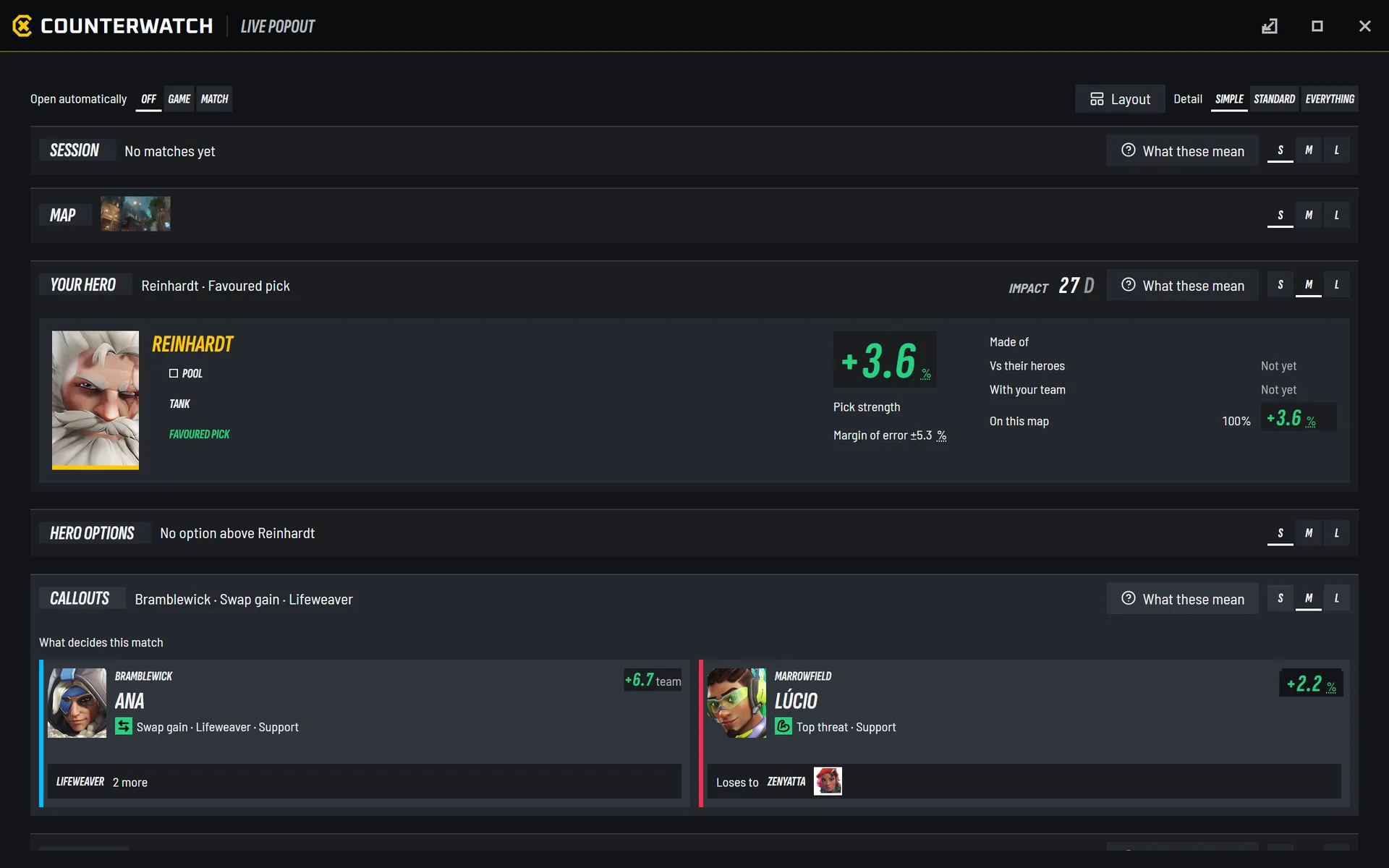
Live is a launcher tab and its own window, which opens with the game: plan your map, lineup and bans before you queue, then follow your hero's pick strength, the callouts, the counters and the whole lobby while you play.
 2.x
 V3
LiveBefore the match, during it, your notes on players, and how much it shows
Before the match
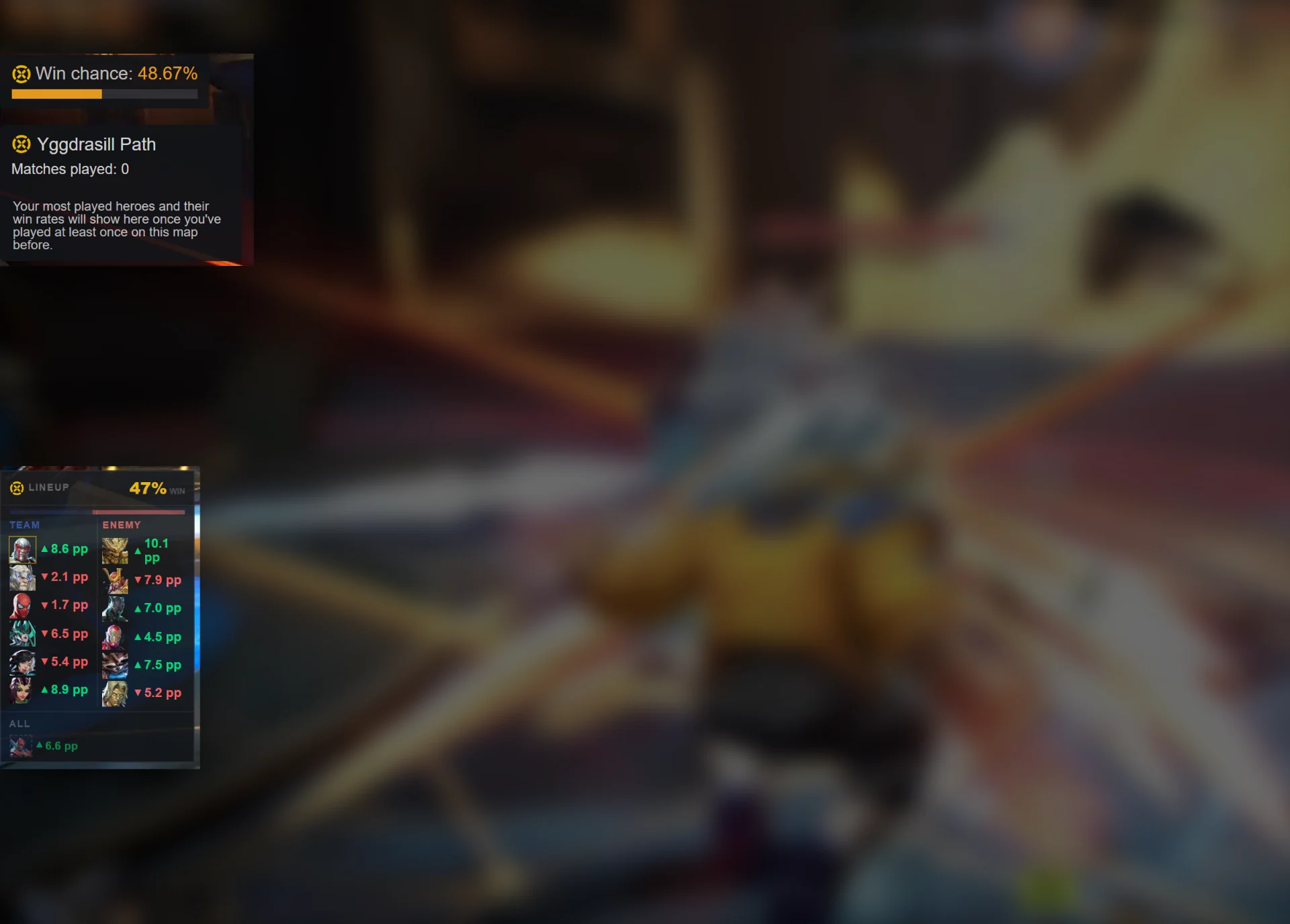
Map: pick a map and see your record, all modes and your heroes on it.Lineup: your team's strength before the match, withTeam powerand a word for it, fromStrongtoWeak lineup.Ban recommendations: ranked against your lineup (Heroes that beat your lineup), or by map and rank until you have one.
During the match
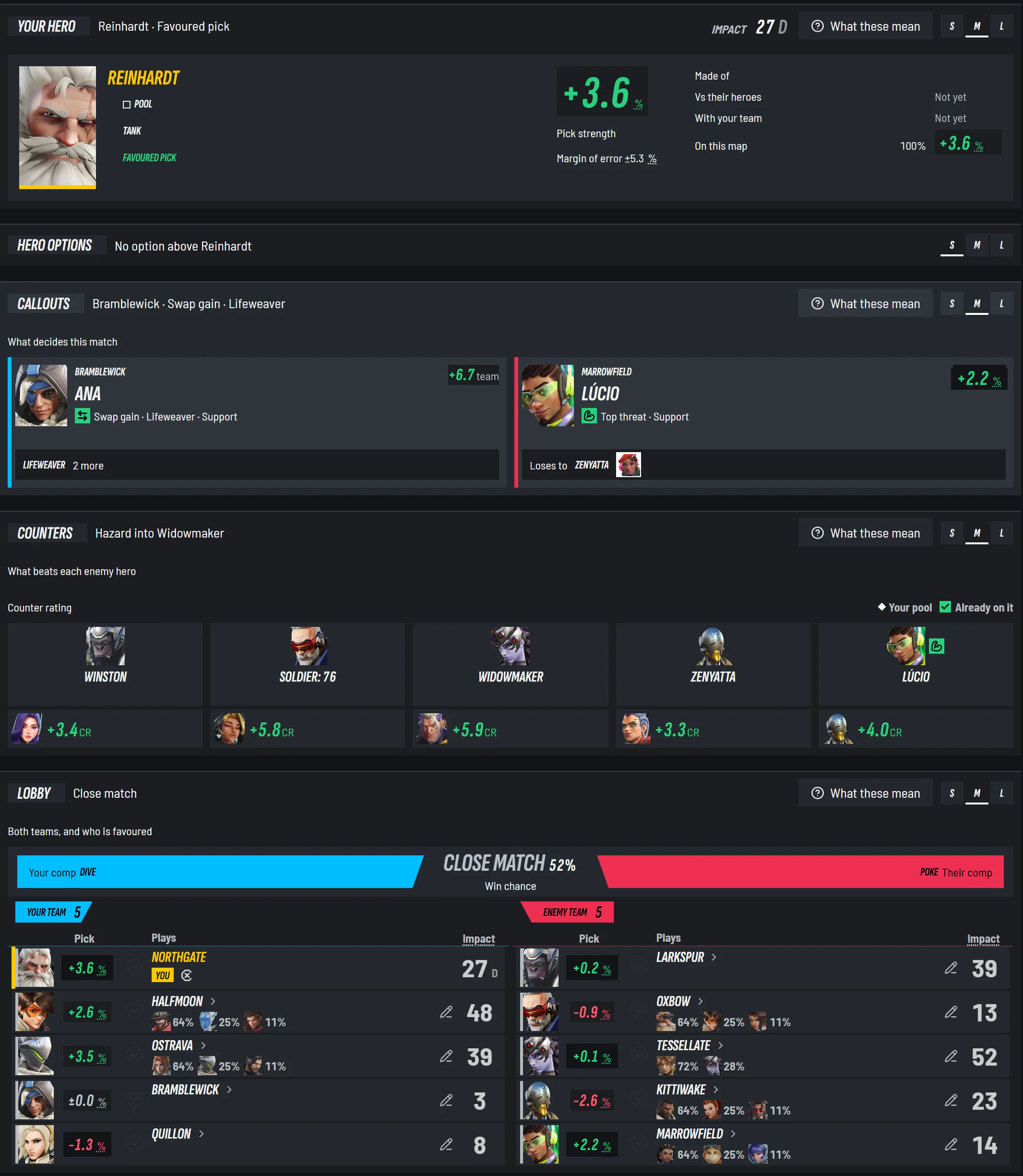
- 1Your hero: Favoured, Even or Underdog, and what it is made of
- 2Your Impact, live
- 3Hero options from your pool
- 4Callouts: who is carrying or struggling, the top threat, the swap gain
- 5Counters: the answer to each enemy hero
- 6Both comps and the win chance, in words
- 7Every player's pick and Impact
- Your hero:
Favoured,EvenorUnderdog, the pick strength as a percent with its margin of error, and what it is made of. - Callouts:
Carrying,Struggling,Top threat,Winning the dueland the swap that would gain most. In Marvel Rivals,Ults ready. - Counters: the answers to each enemy hero, rated.
- Lobby: every player's pick, Impact and what they lose to, both comps, and the win chance in words, from
Close matchtoWell ahead.
Your notes on players
Add a note to any player from their row in the lobby. Open a row for your note, this match, their history with you, and in Overwatch their career. A Last match flag marks the players who were in your last match.
The session band
At the top of Live, the session band shows your record and Impact this session, a number to beat from your own recent sessions (Last session, Best this week, Best in 30 days), and once the game closes, a verdict against your week, your month and your usual.
How much it shows
Detail:Simple,StandardorEverything.- Every section has its own size,
S,MorL, kept for each moment of the match. Layouttakes a section off the page and sets what comes first.What these mean, or the?key, explains every figure on the page.- The popout opens with the game by default. Choose
Off,GameorMatchin Settings →App, or pressAlt+P.
After every match
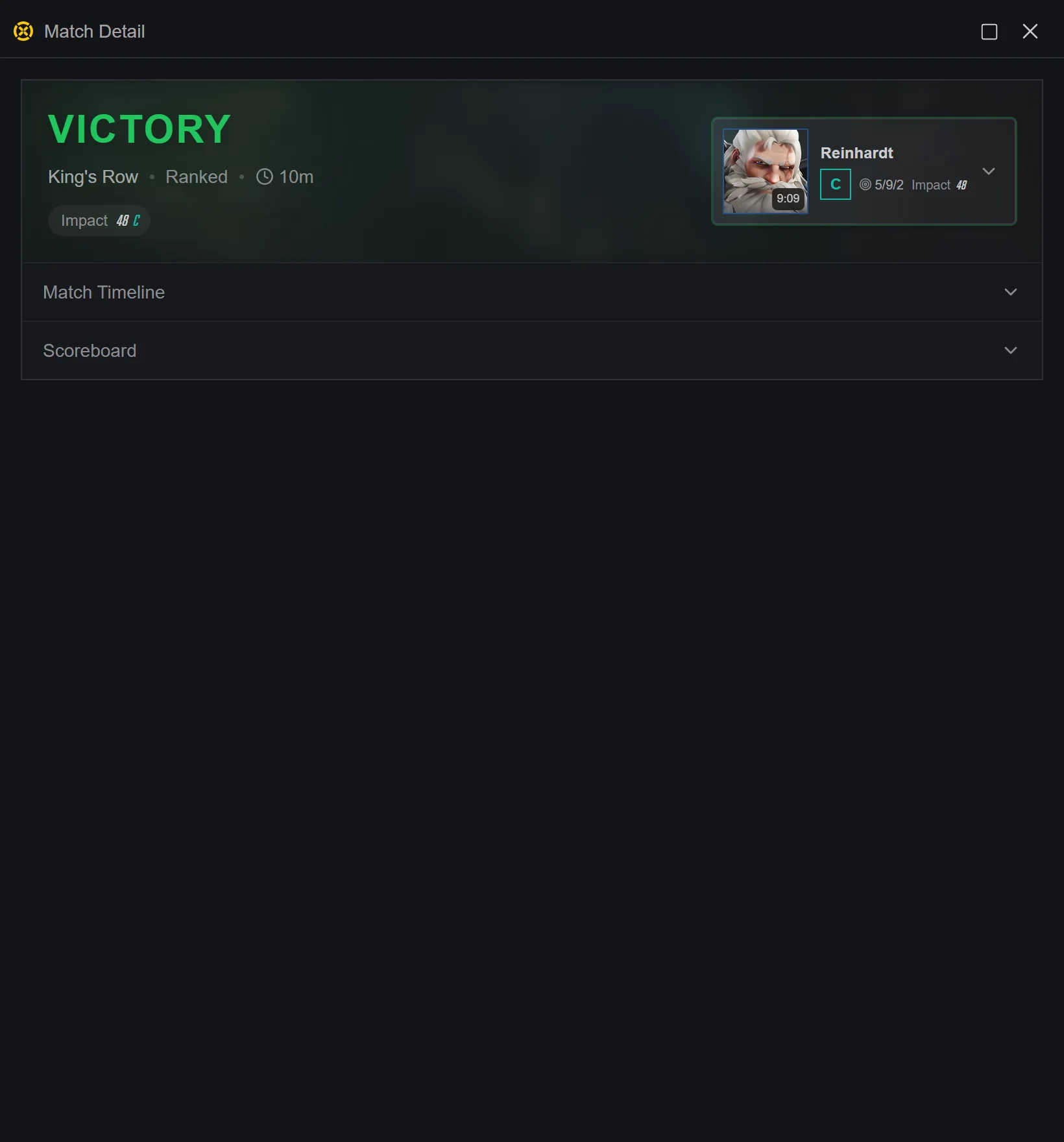
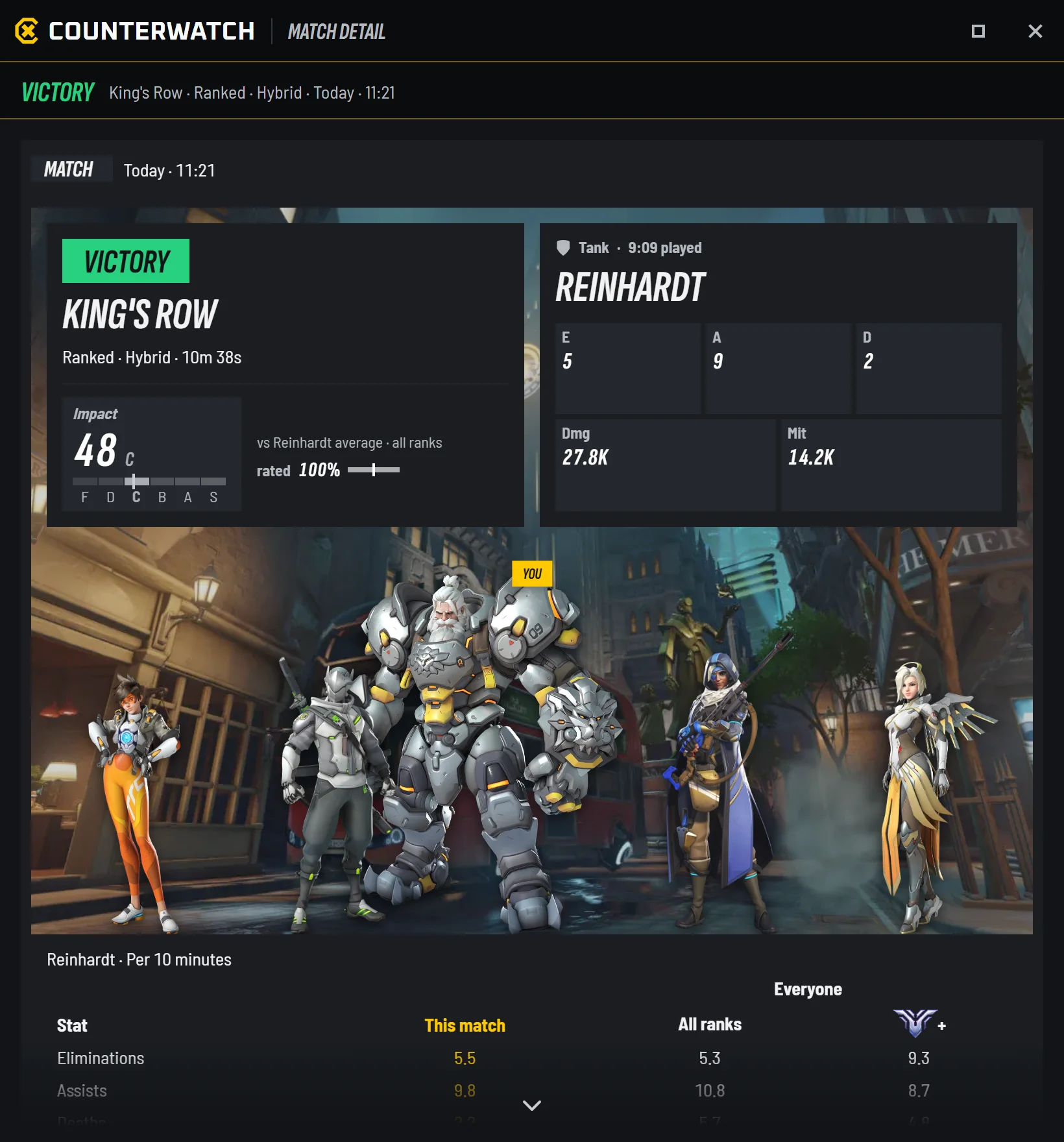
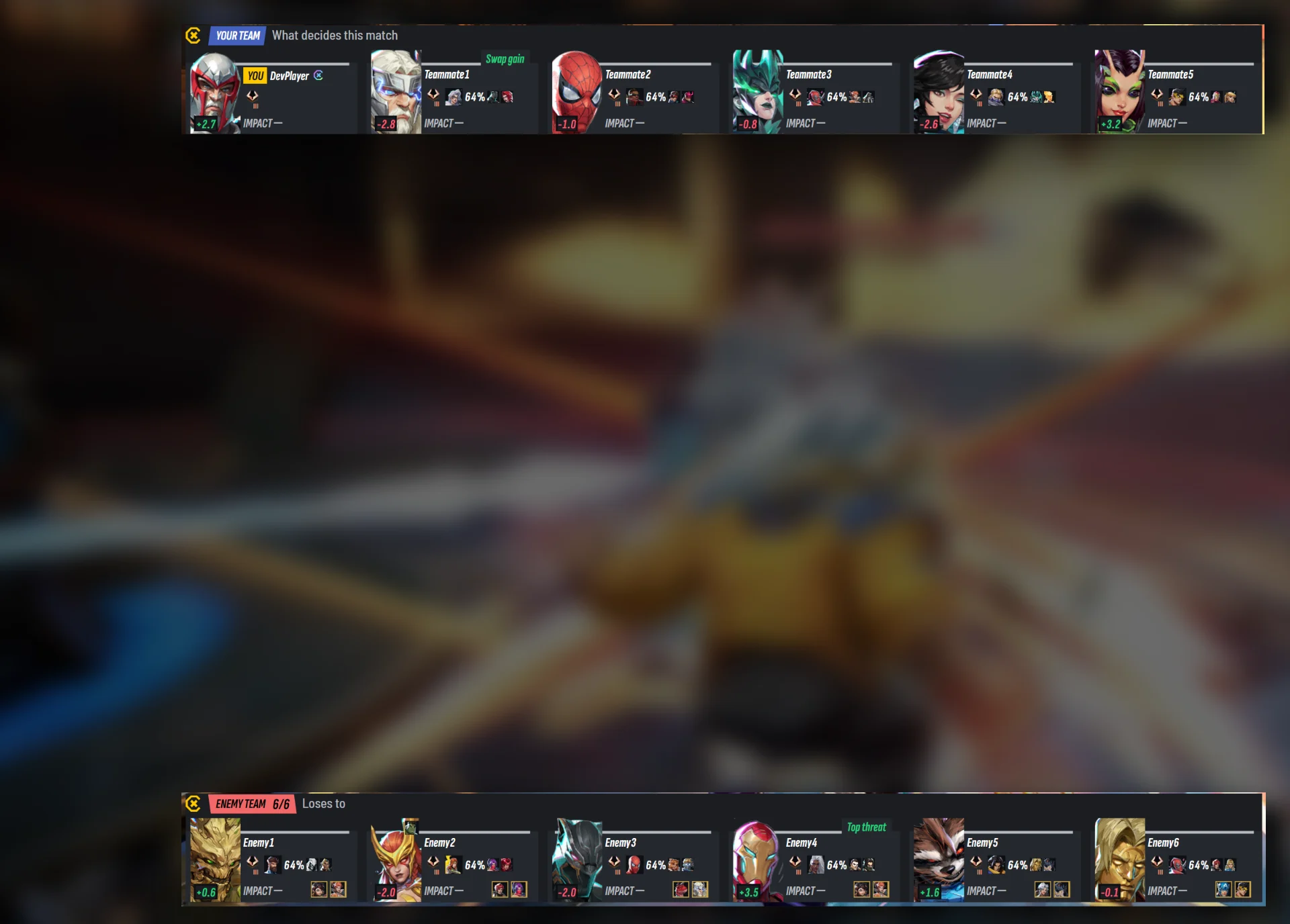
The match window now shows Impact for everyone in the lobby, both teams, and the lobby's top three. Beside them are your Impact for the whole match across every hero you played, your numbers against your rank and the ranks above it, and each round's fights. It no longer opens by itself: open it from View match on the launcher's Last match strip.
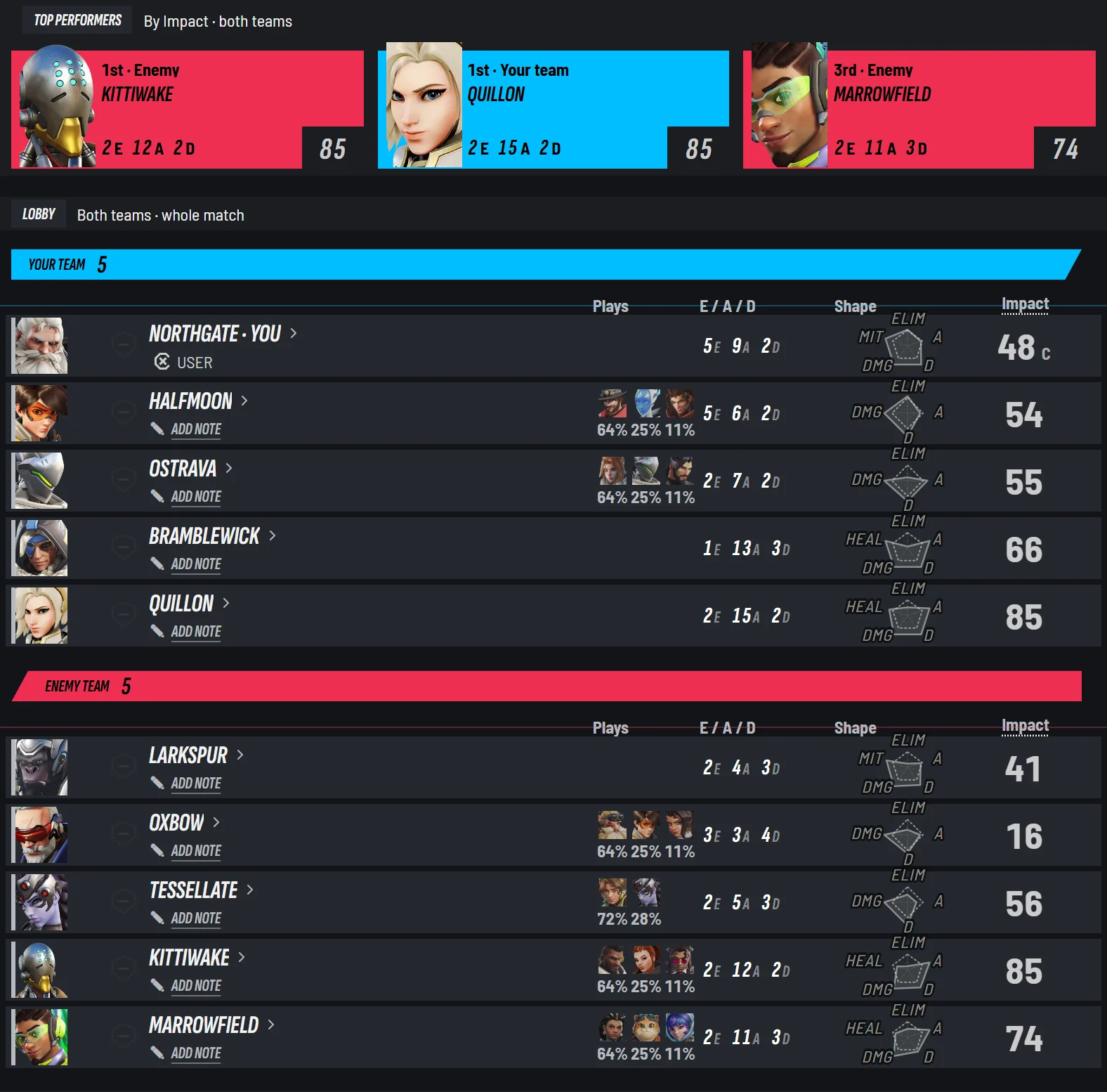
- 1The lobby's top three, from both teams
- 2Every player's Impact, both teams
- 3A note on any player, only for you
- 4What each player played, by time
- 5Shape: their stats per 10 minutes, drawn as one outline
More detailsEvery part of the match window, and how you open it
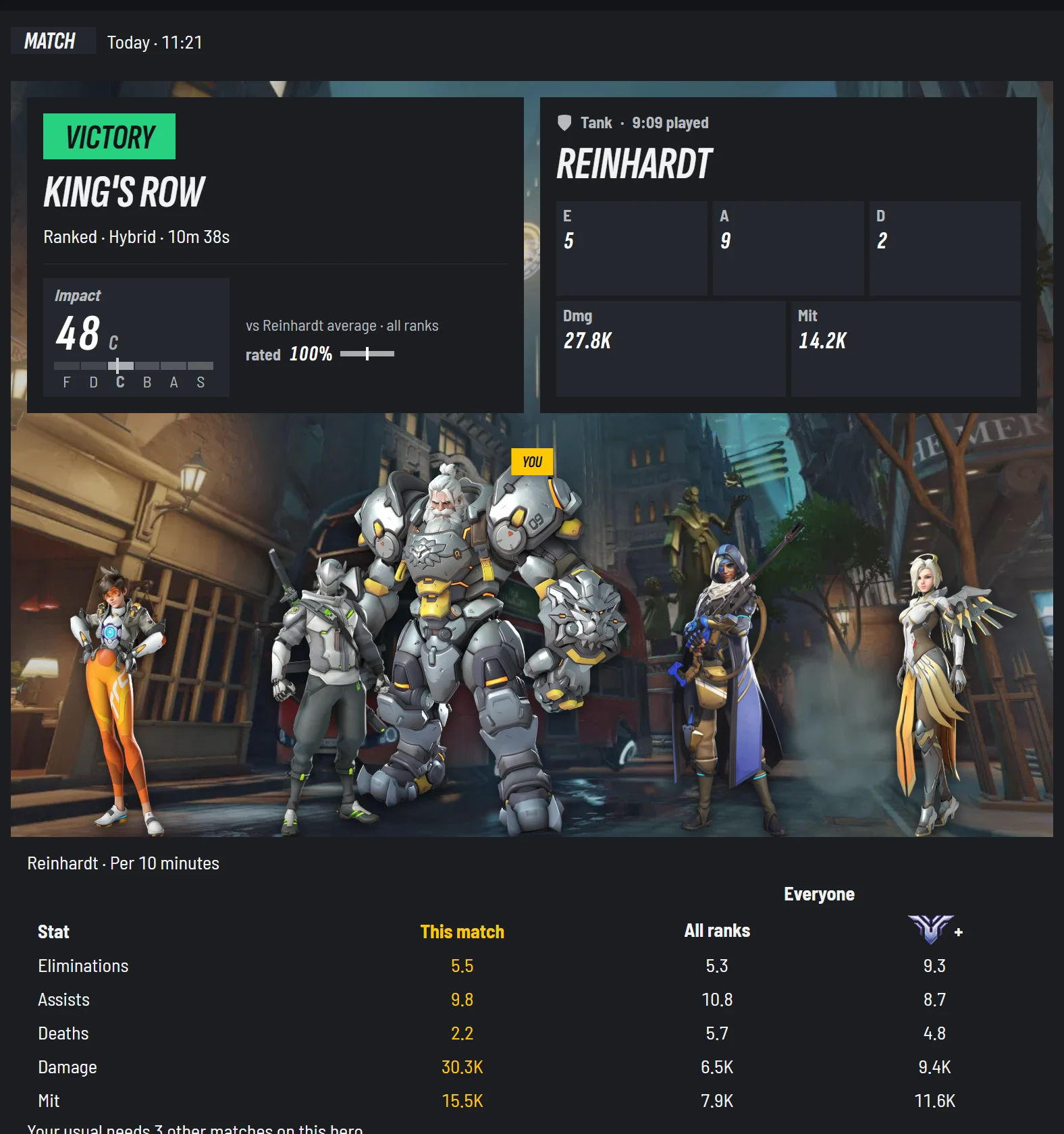
- 1Your Impact for the whole match
- 2Your hero and your line
- 3Your team on the map
- 4Per 10 minutes: this match against everyone at your rank and the top rank
- Your Impact for the match is across every hero you played, with how much of the match was rated, and how it compares with your usual on that hero.
MVPmarks it when yours is the highest in the lobby. - Per 10 minutes:
This matchandYour usual, beside the average at your rank, one rank up and the top rank. A thin cell saysToo few. Top performers: the three highest Impacts in the lobby, from both teams.Your heroes: a plate for each hero you played, by time played.Your notes: notes on the match, only for you.Lobby: every player's rank, heroes, line, Impact and your record with them, and in Marvel Rivals the bans.Fights: each round's fights, your team's deaths above the line and theirs below, won and lost. Click a fight for its kill order. In Marvel Rivals it also says which fights you used your ultimate in. Fights are saved on the PC that played the match.- In Marvel Rivals Competitive, your recorded score for the match.
- A Stadium series opens as one match window, with a strip of its rounds to read one round or the whole series.
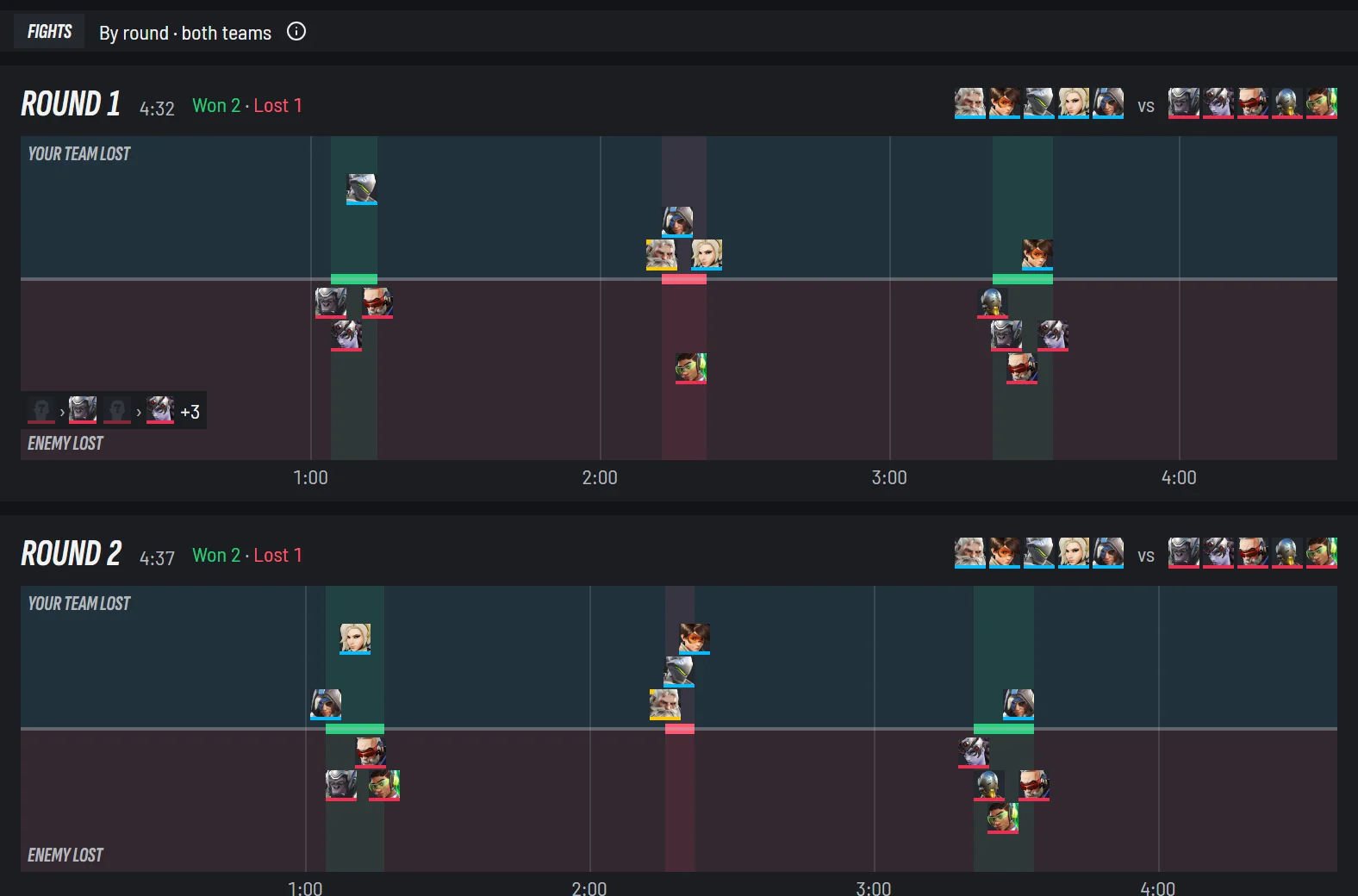
- 1Each round: fights won and lost
- 2Your team's deaths above the line, theirs below
- 3Both line-ups
How you open it: the match window no longer opens by itself after a match. The Last match strip at the top of the launcher has View match, and a match opens inside the launcher, with Open in its own window for a window of its own.
Profile
Your own stats now live on Profile, in six tabs: Season, Career, Sessions, Match history, Players and Social. Season tells this season as a story, from your rank week by week to whether you win more after a swap or by staying. Career adds Heroes faced, your kills and deaths against each enemy hero beside what players on your heroes get, so you see whether it is you or the hero, and your patterns: when you play best, and what long sessions, losses and breaks cost you. Sessions puts every session in one row.
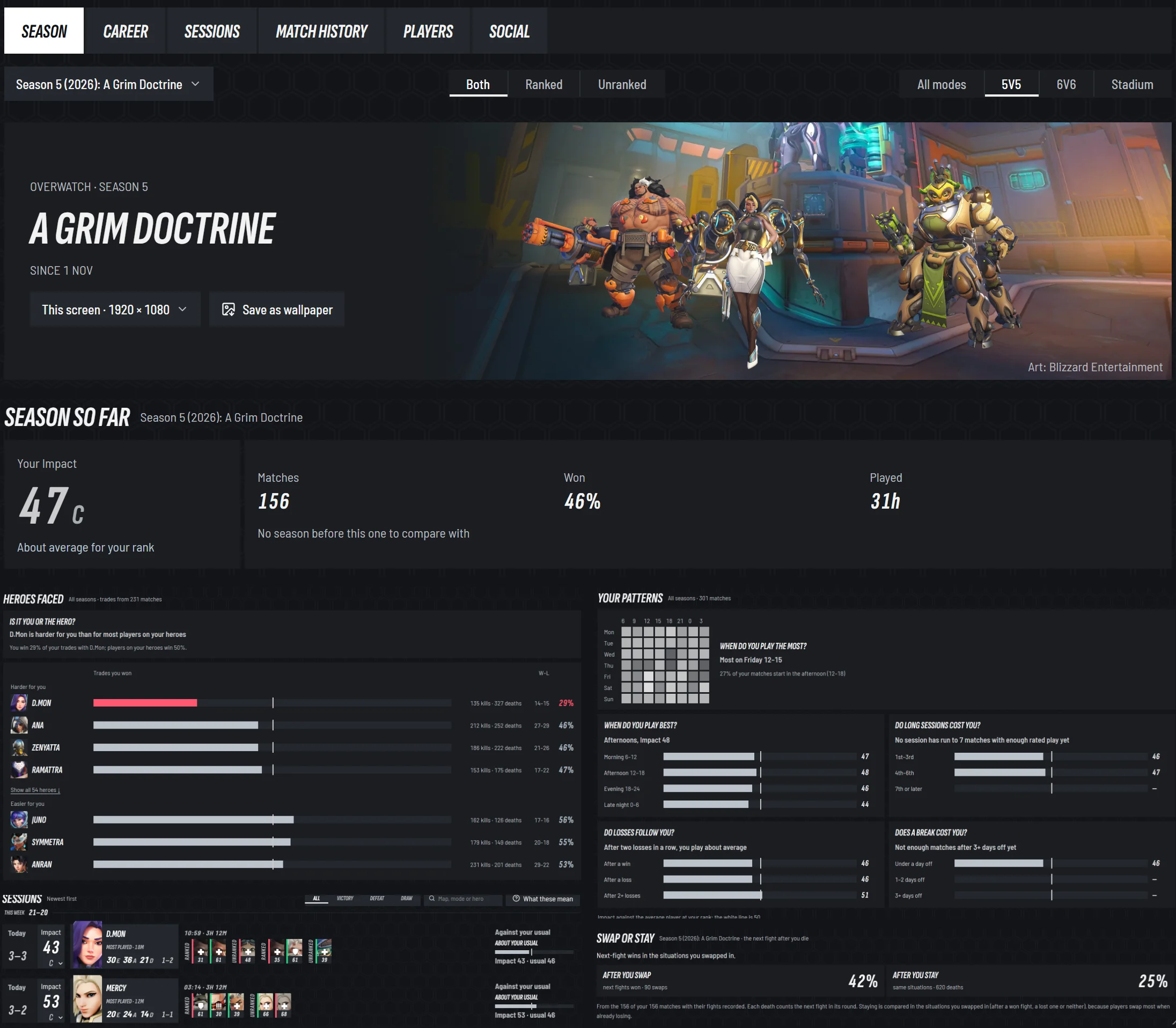
- 1Six tabs: Season, Career, Sessions, Match history, Players and Social
- 2Season: your season as a story, with your three most played heroes standing in it, and Save as wallpaper
- 3Season so far: your Impact, matches, wins and time played, against the season before
- 4Heroes faced: is it you or the hero?
- 5Your patterns: when you play best, and what long sessions, losses and breaks cost you
- 6Sessions: every session in one row, with its Impact and a mark for every match
- 7Swap or stay: after a death, how often you won the next fight when you swapped against when you stayed
More detailsSeason, Career, Sessions, Match history, Players and Social
Season
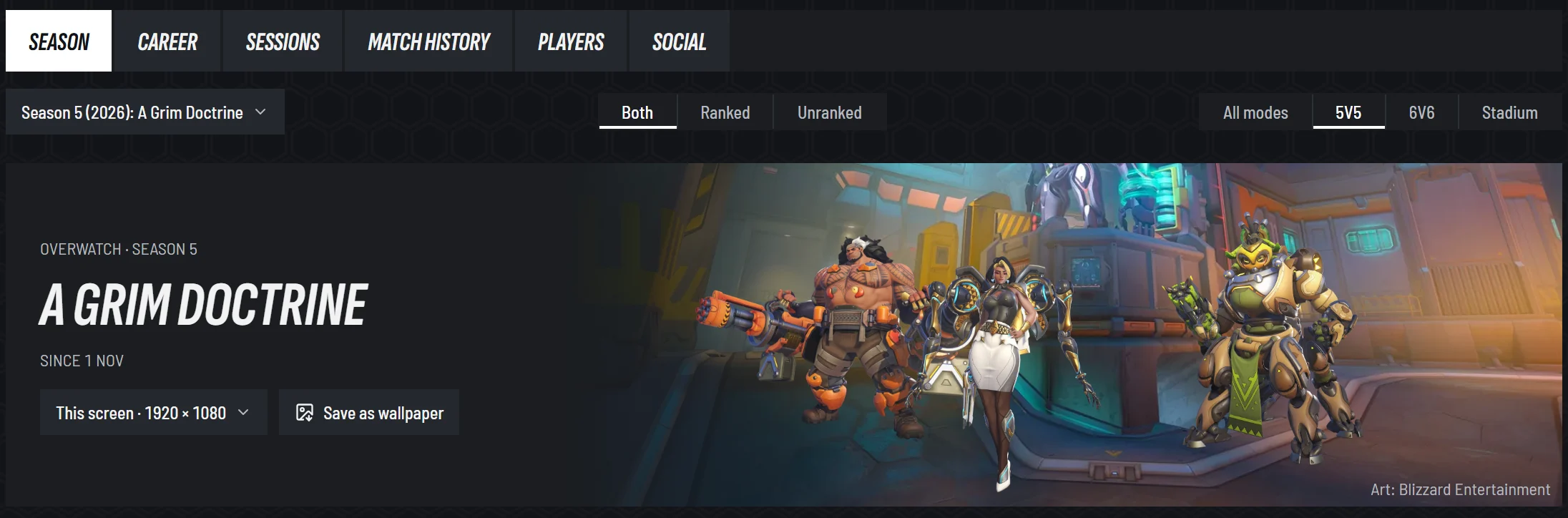
- 1Six tabs: Season, Career, Sessions, Match history, Players and Social
- 2Game type and mode
- 3Save your season as a wallpaper, at your screen size
- 4Your three most played heroes, standing in the season
- The season head: the season's picture with your three most played heroes standing in it, and
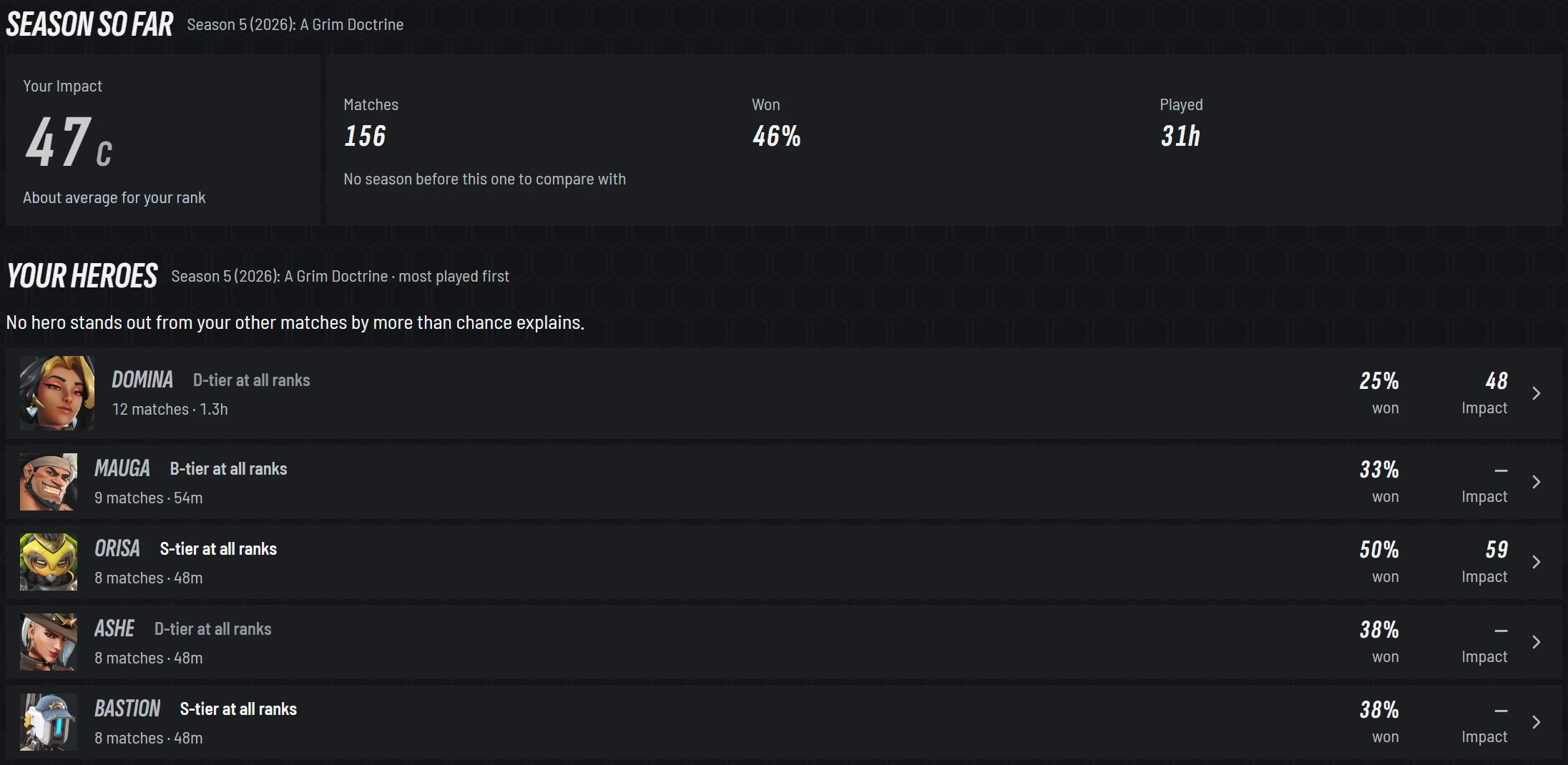
Save as wallpaper, at your screen's size, with your season's peaks on it. - Rank progress: a plate per ladder, and each week of the chart shaded by your Impact: better than average for your rank, about average, or worse. In Overwatch the role plates cut the whole page to that role.
- Season so far: your Impact, matches, wins and time played, each against the last season.
- Your heroes: record, tier at your rank and Impact for each.
- Solo vs group, in Overwatch: your record alone and in a group, by group size.
- Played with: the teammates you have won and lost with.
- Swap or stay: after a death, how often you won the next fight when you swapped against when you stayed.
Game type:Both,RankedorUnranked(in Marvel Rivals,CompetitiveorQuick Match).

Career
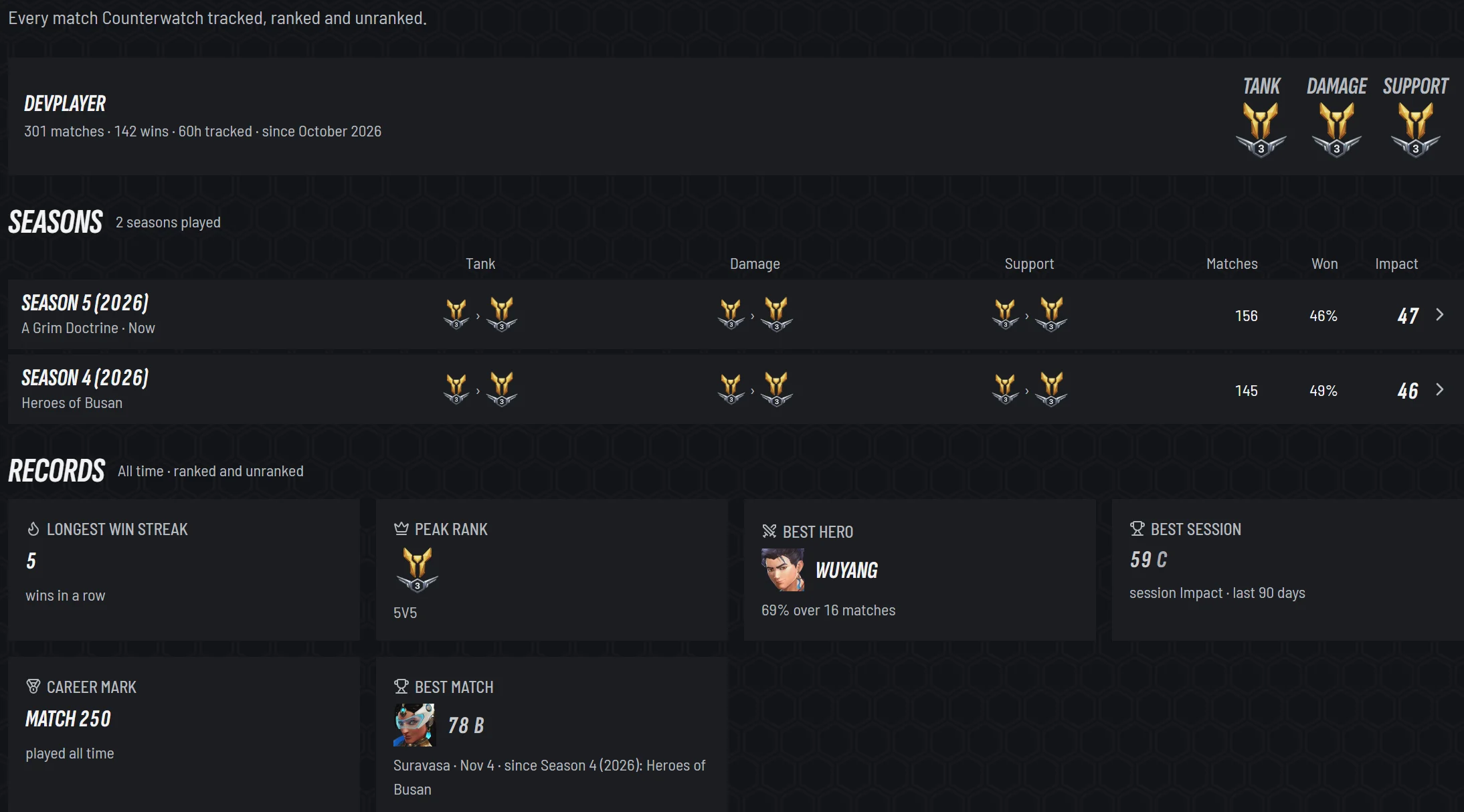
- 1Your totals, and your rank on each ladder
- 2Every season, first rank to last, with your Impact
- 3Records: streaks, peaks, your best hero, session and match
Career is everything since you installed Counterwatch, on one page:
- Totals, and a rank per ladder.
- Seasons: a row each, from first rank to last, with matches, wins and Impact. A row opens that season.
- Records: longest win streak, peak rank, best hero, best session, best match.
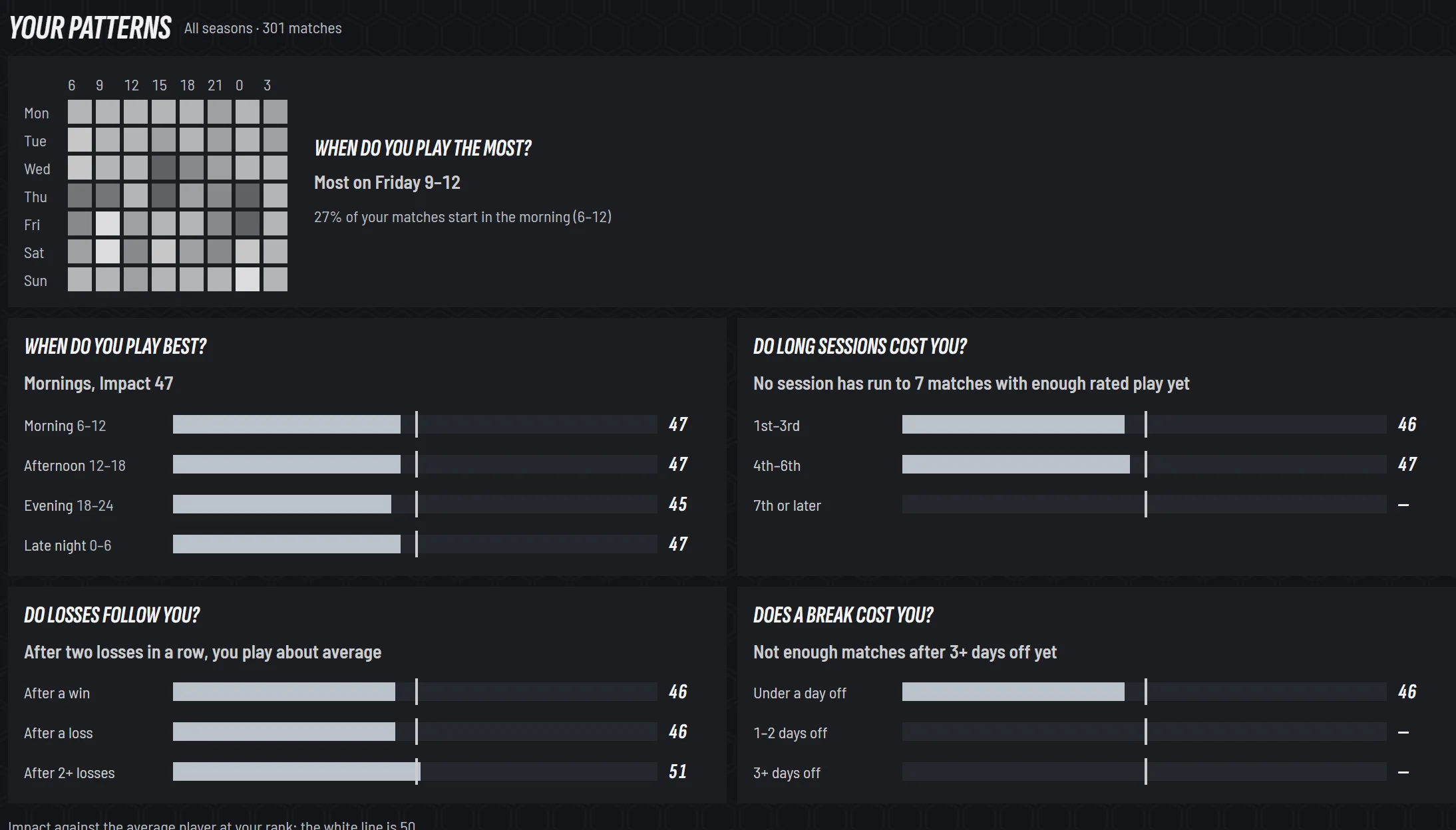
- Your patterns: when you play best, whether long sessions cost you, whether losses follow you, whether a break costs you.
- Heroes played by hours, and what you play, role by role, each season.
- Heroes faced: your kills and deaths against each enemy hero, beside what players on your heroes get against it, so you see whether it is you or the hero. It counts the fights each PC recorded, older matches included, and fills in over the days after the update.
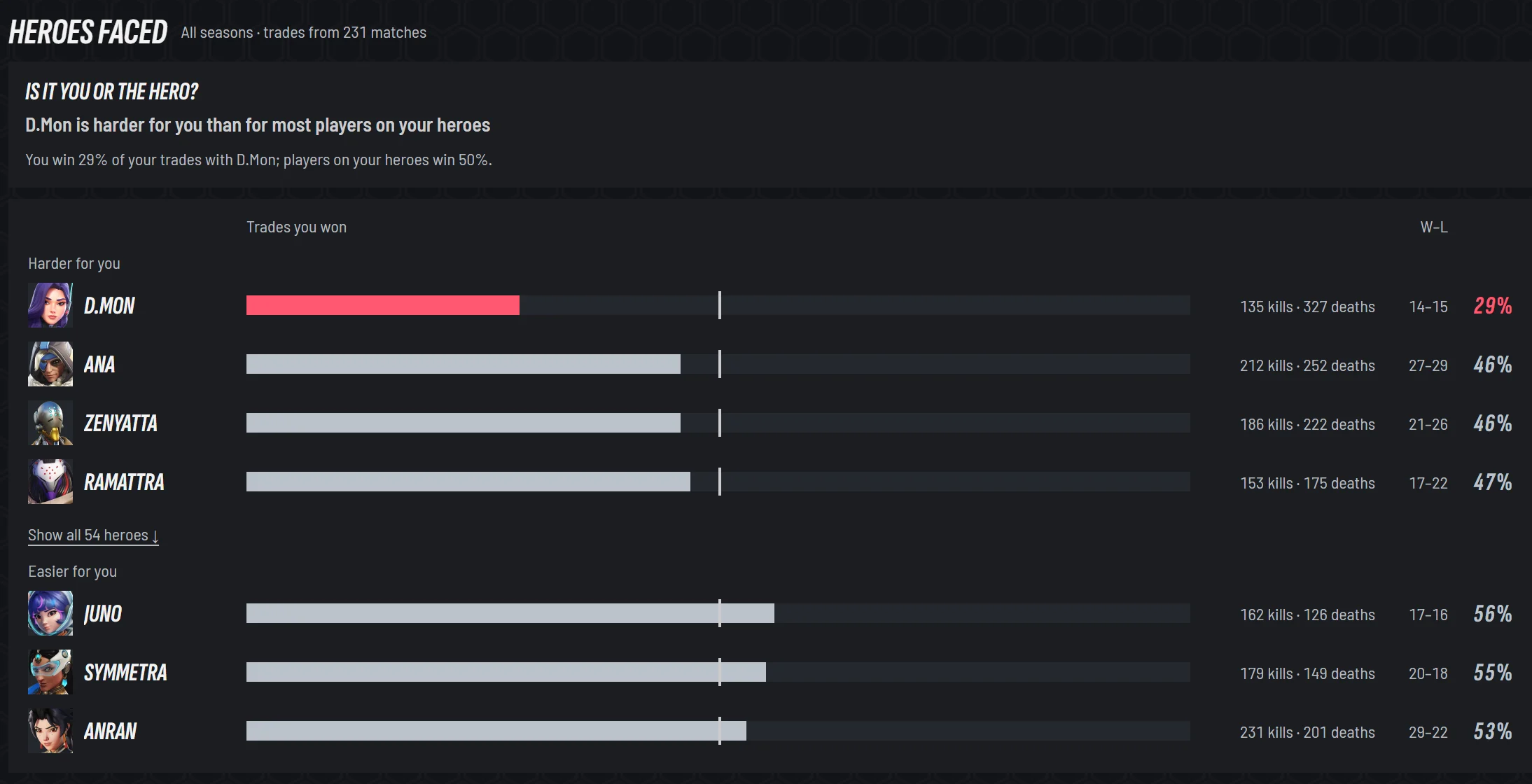
- 1Is it you or the hero: the enemy hero that is harder for you than for most players on your heroes
- 2The trades you won against each enemy hero; the line is what players on your heroes win
- 3Your kills and deaths against it, and your record
- Your maps: your toughest and best, by game type and role.
- When your heroes are banned, in Marvel Rivals, and your milestones.
Sessions
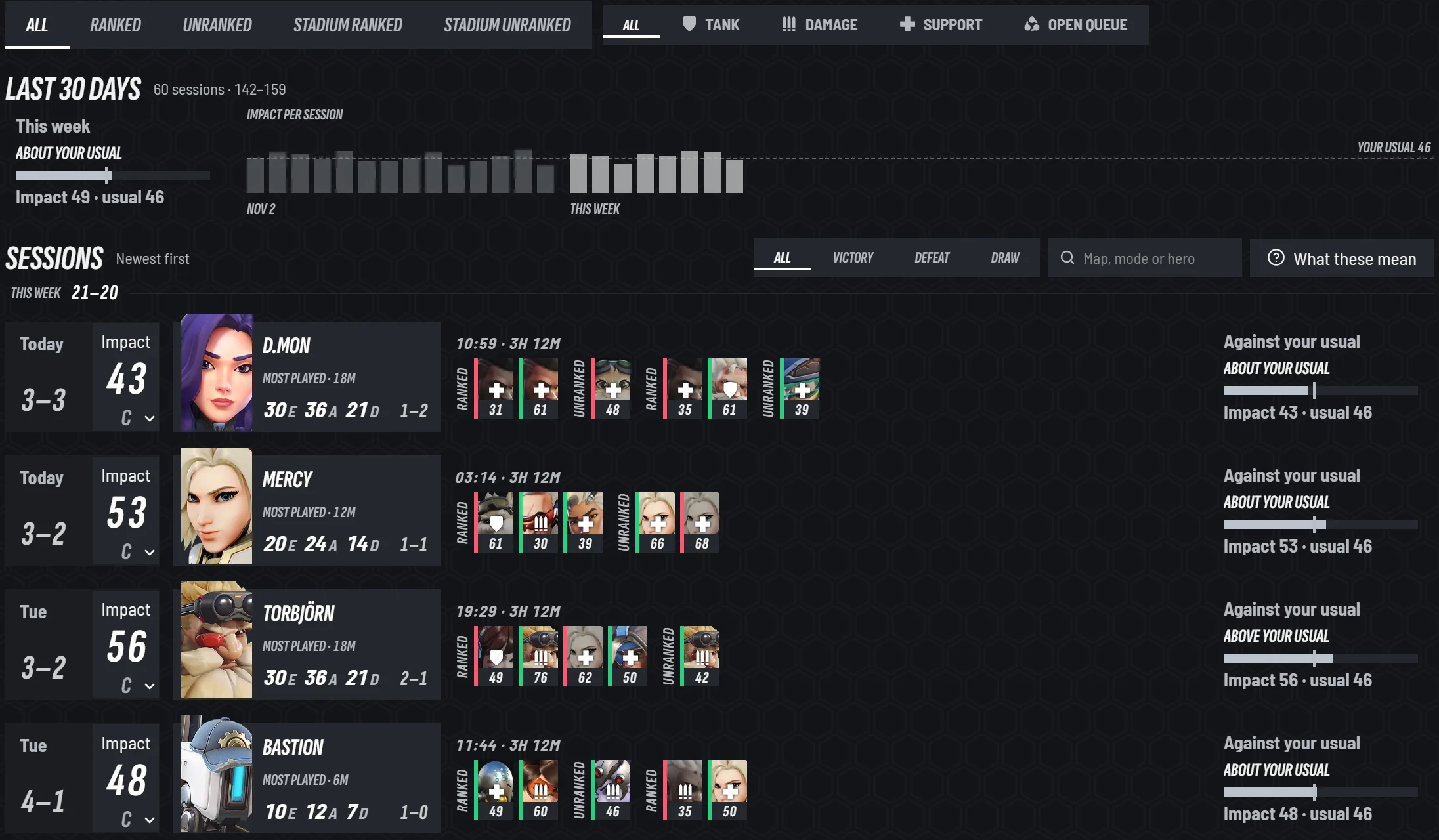
- 1Mode and role tabs
- 2Your last 30 days against your usual
- 3Each session in one row, with its Impact
- 4A mark for every match, with its Impact
- 5The session against your usual
Every session is one row, with its Impact, record, most played hero and a mark per match. Filter by mode, role and result, or search a map, mode or hero. Open a session for each match in it.
Match history, Players and Social
- Match history is every match, one line each, with filters and search by map, hero or player, and the lobby one click away.
- Players moved here from Stats: your teammates, your rivals and the players from your recent matches. A Counterwatch mark shows who had Counterwatch running last time you played together.
- Social has your in-game name and your Counterwatch username, each copied with a click, and the title your name shows.
Home
Home is a briefing for your next session: the season and a start button, your heroes with their tier at your rank and your own record on each, what is on in the game this week, and the news since you last played.
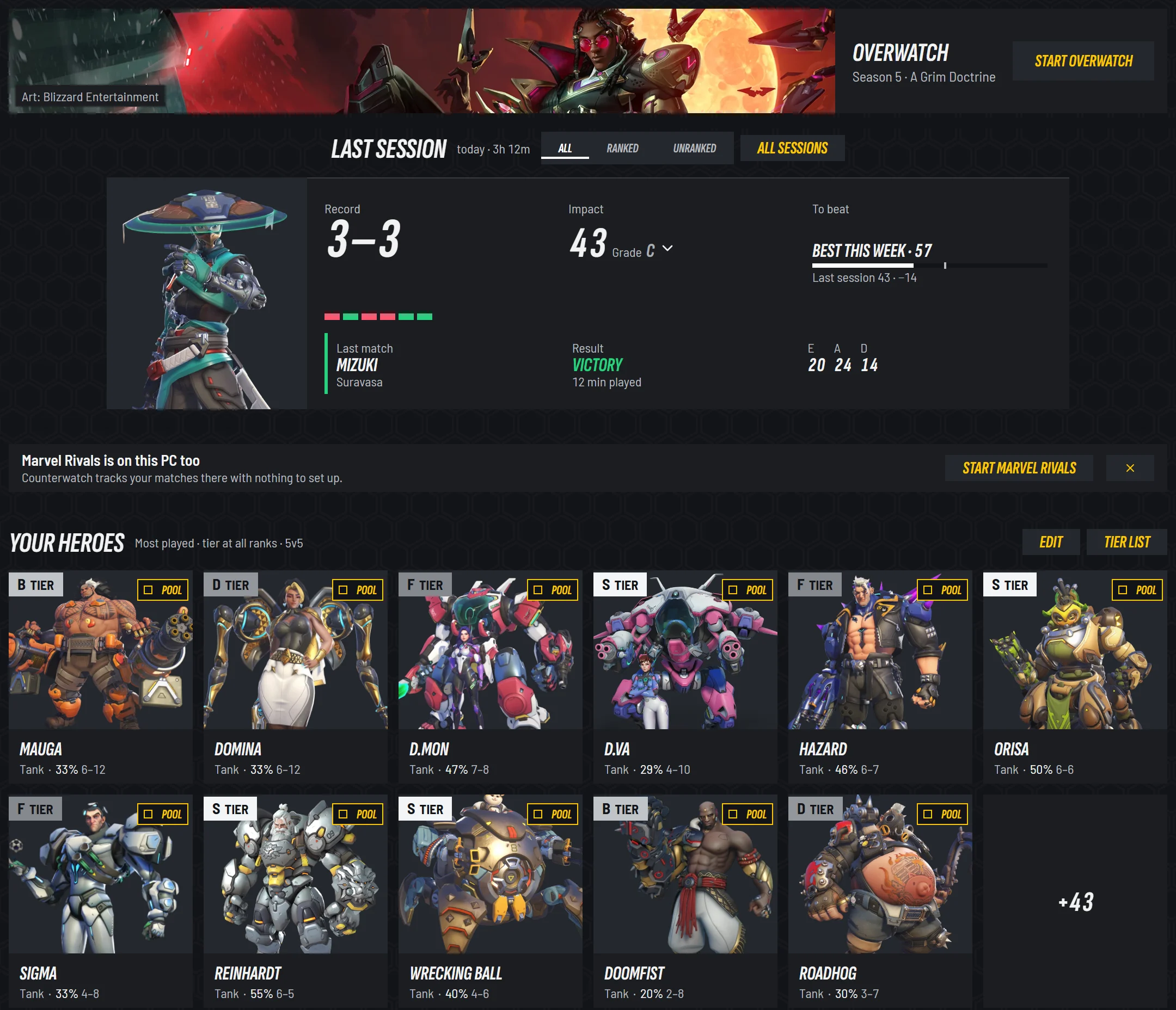
- 1The season, and Start
- 2Your last session, and the number to beat
- 3The other game, when it is on your PC too
- 4Your heroes, each with its tier at your rank and your record
- 5Edit your pool, or keep a hero out of every suggestion
More detailsEvery part of Home
- The season strip: the season's art, its name, and
Startfor the game orOpen Liveonce it runs. Set up: one step at a time, until every step is done.Calendar: five weeks of events, what is on now, what ends this week and what is coming.- Your last session, with the number to beat next time.
Your heroes: each hero in your pool with its tier at your rank and your record on it.Editchanges your pool, andNever suggestkeeps a hero out of every suggestion.News: what is new since you last played, with app updates folded into one line.- The other game: if both games are on your PC, a line to start the other one.
Stats, News, Settings and Help
Stats keeps the tier list and the maps, and every figure on them says whose it is: You for your own, Everyone for every player's. News is a page of its own, and Settings has six tabs instead of one long page.
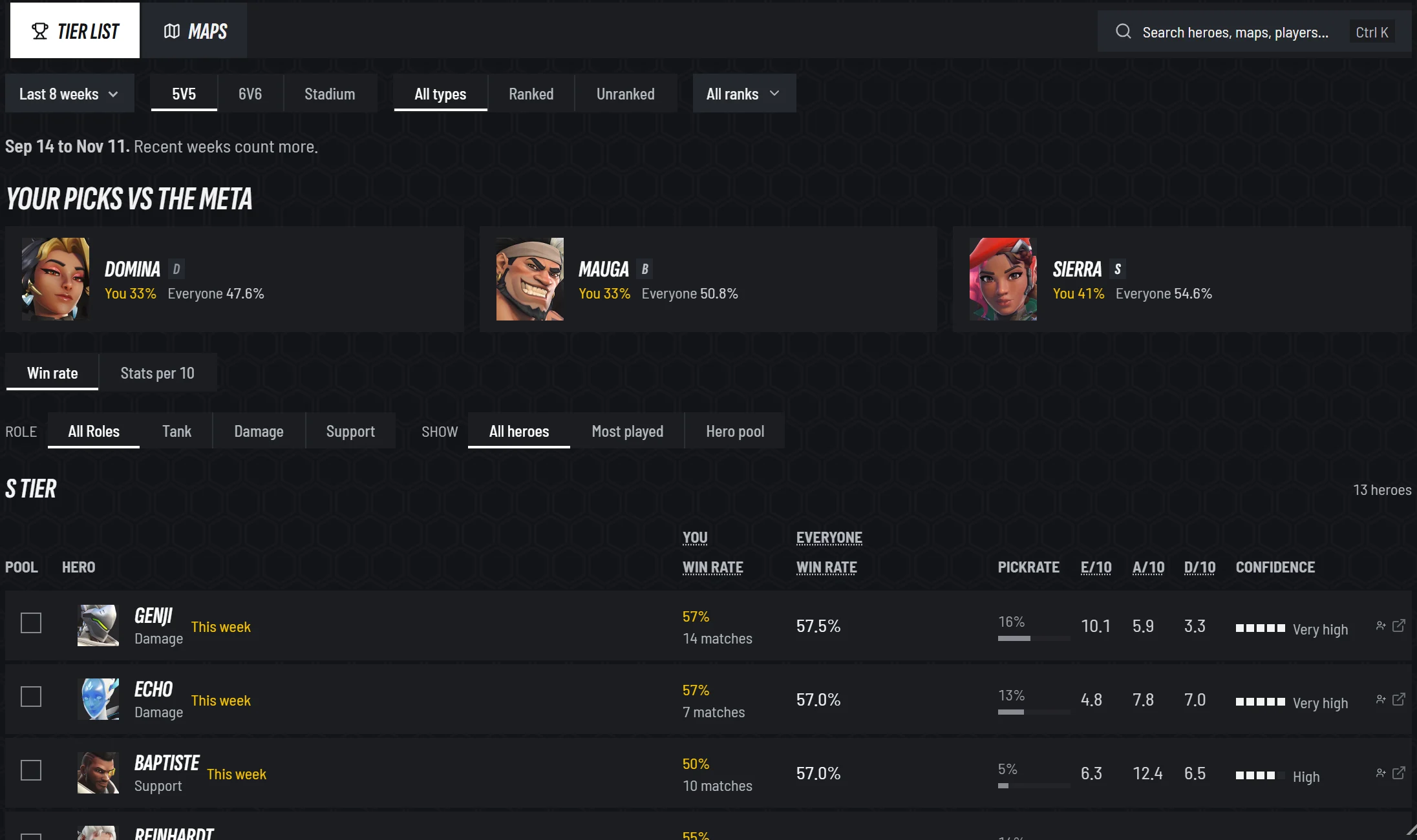
- 1Your picks vs the meta: your win rate on your heroes beside everyone's
- 2Win rate or stats per 10 minutes
- 3You: your own win rate on each hero
- 4Everyone: every player's win rate, pick rate, stats and confidence
More detailsThe tier list, maps, hero pages, News, Settings and Help
Stats
- Your picks vs the meta, at the top of the tier list: your most played heroes, your win rate on each beside everyone's.
- Tier list:
Win rate,Stats per 10, and in Marvel Rivals Competitive,Ban rate. Show all heroes, your most played or your pool. - Maps: everyone's pick share beside your record, and sort by your win rate. An opened map leads with your record there.
- A hero's page puts your win rate beside everyone's,
You against <hero>with your kills and deaths against it, and your numbers per 10 minutes against your rank and the ranks above it.
News
Two tabs: your game's patch notes and news, and Counterwatch's updates and articles. The release notes are their own page.
Settings
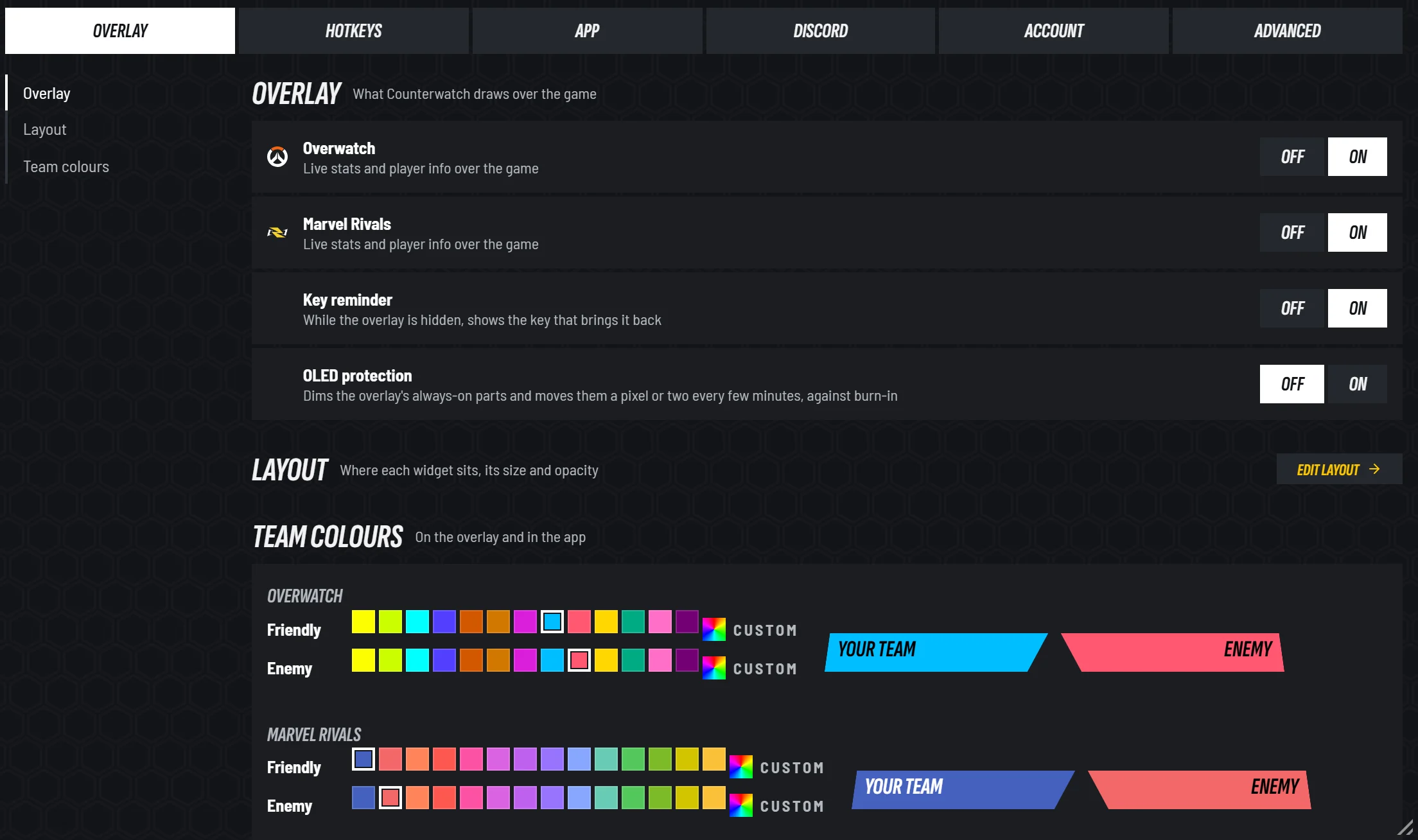
- 1Six tabs: Overlay, Hotkeys, App, Discord, Account and Advanced
- 2OLED protection
- 3Team colours: any colour for each team, per game, with Premium
Six tabs, and every choice shows all its options:
Overlay: the overlay on or off per game, team colours (Premium), OLED protection and the layout editor.Hotkeys:Track this match(Alt+T) andOpen Counterwatch in game(Alt+C) are new.App:Automatic tracking, when the Live popout opens, how much Live shows, aSizefor the text and controls in every window, from 75% to 150%, andReduce animations.Discord,AccountandAdvanced.
Help
Counterwatch, FAQ and Support, with the tips for each page again, how Counterwatch works, and how to hide or remove it.
What changes or goes
A few things work differently or go, and these are the ones to know before you update.
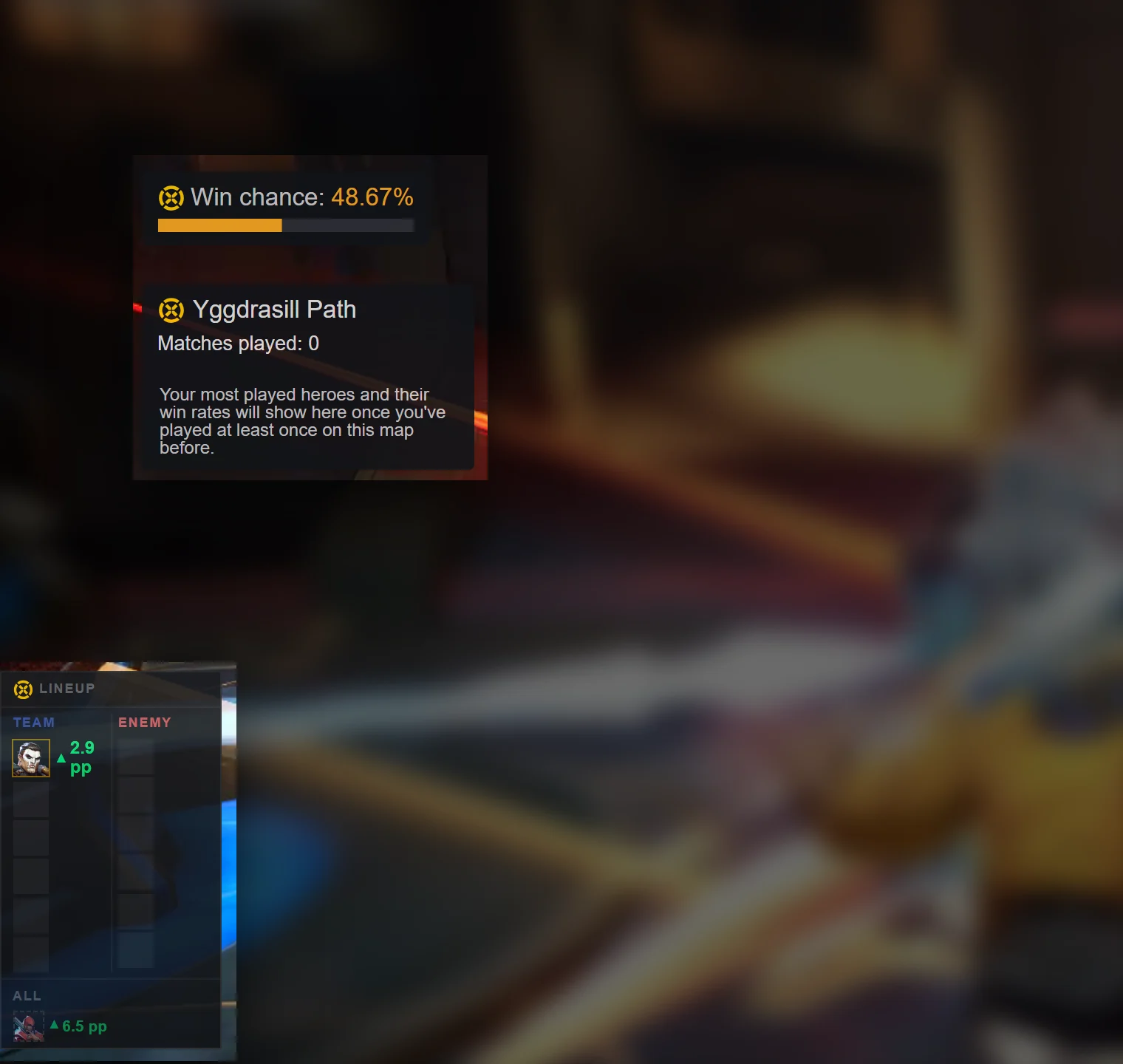
- Four overlay widgets are replaced. The Players Window, Match Lineup, Map Performance and Win Chance give way to the hero-select briefing, the scoreboard widgets, the Impact meter and the round debrief, which carry what they showed. The Players Window's hotkey,
Alt+X, goes with it. - Marvel Rivals' rank-based win chance goes. The lineup win chance on the scoreboard and in Live stays; it is worked out from the heroes, not the ranks.
- Arcade, custom games and the other side modes are no longer tracked unless you turn them on: in Settings →
App→Automatic tracking, or one match at a time withAlt+Tin the match. - Pages moved. Stats → Overview is now Profile, Sessions and Players are Profile tabs, the overlay editor is
Overlayon the rail, and the release notes are in News. - The match window no longer opens by itself after a match. Open it from
View match.
 2.x
 V3
 2.x
 V3
More detailsEach replaced widget, tracking a mode, and what fills in later
Where each widget went
- Players Window → the scoreboard widgets: rank, most played heroes and your note on each player.
- Match Lineup → the pick on every scoreboard seat, the win chance on your plate, and the options and swaps in the briefing and the debrief.
- Map Performance → your record on the map, in the briefing's head and on your scoreboard plate, with your most played heroes there.
- Win Chance (Marvel Rivals) → not replaced. It was worked out from ranks; the lineup win chance is a different number.
Tracking a mode that is off by default
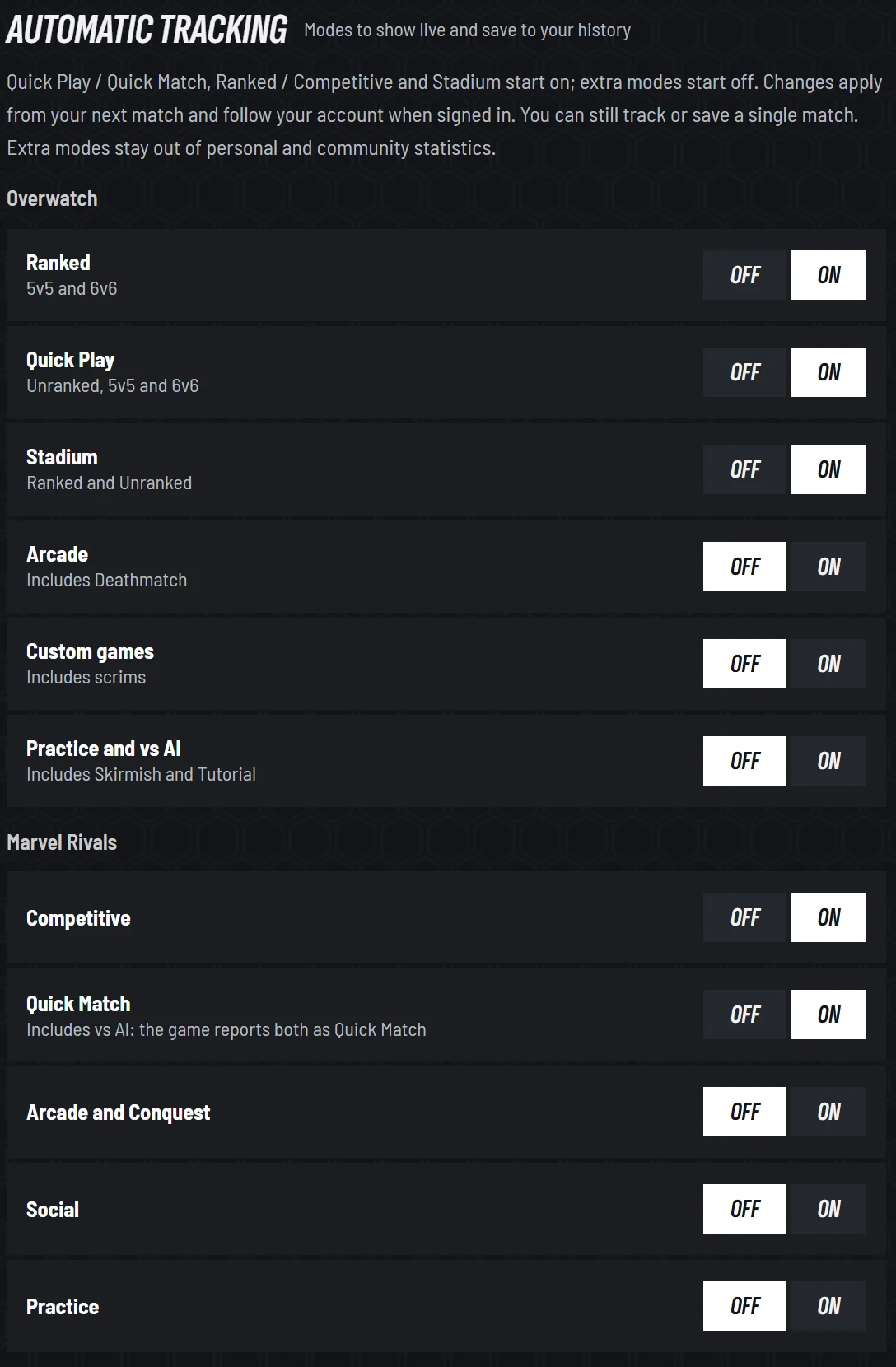
- 1Which modes start on, and which you turn on
- 2A switch for every mode, per game
- In Settings:
App→Automatic trackinghas a switch for every mode, from Arcade to custom games and practice. It applies from your next match and follows your account. - In the match: press
Alt+T, orTrack this matchon Live. Press it again to stop. - After the match: a match you did not track can still be saved, until your next match starts.
- A custom game has no Impact, because there is nothing to rate it against.
What fills in after the update
Heroes faced and You against <hero> are built from the fights each PC recorded, older matches included, and fill in over the days after the update.
If something looks half old and half new
Restart Counterwatch once.
Smaller changes
- Notifications in one place: a bell in the title bar opens your Inbox, for app updates, game news, season and event starts, sales and replies to your support requests, with a switch per kind in Settings →
App→Inbox. - Ultimate charge in Overwatch, yours and your teammates', on the overlay, as Marvel Rivals has it.
- Subscribing no longer needs an Overwolf account, and a subscription you have now carries on as it is.
- A new icon, the C and X mark, on the taskbar and in the tray.
- Text size from 75% to 150%, and
Reduce animations, in Settings →App. - Profile and Stats remember their tabs and filters across a restart.
Counterwatch is free, for Overwatch and Marvel Rivals. V3 and Counterwatch Standalone come out on : restart Counterwatch then, or get either version from the download page. To hear about it by email, get Counterwatch updates.
V3 does not mean Counterwatch is done. More new features and improvements are coming in the weeks after the launch, on top of everything here. Many of these features started as your suggestions in the Discord, and I'll be improving Counterwatch faster after this release than before. Tell me what you think in the Discord, through Help shape Counterwatch in the app, or at oskar@counterwatch.gg.
Ready for the live version?
Counterwatch runs inside Overwatch and Marvel Rivals. Live counter picks, win chance, and hero swaps without typing or tabbing out.
- Deeper stats - personal win rates, your Impact on every hero, and match history beyond what's shown here
- Live match data - real-time counter suggestions and win chance as heroes are picked
- Performance tracking - an Impact rating for every session, match and hero, read against the average player at your rank
- In-game overlay - match roster, hero swaps, and counter picks right on your screen