
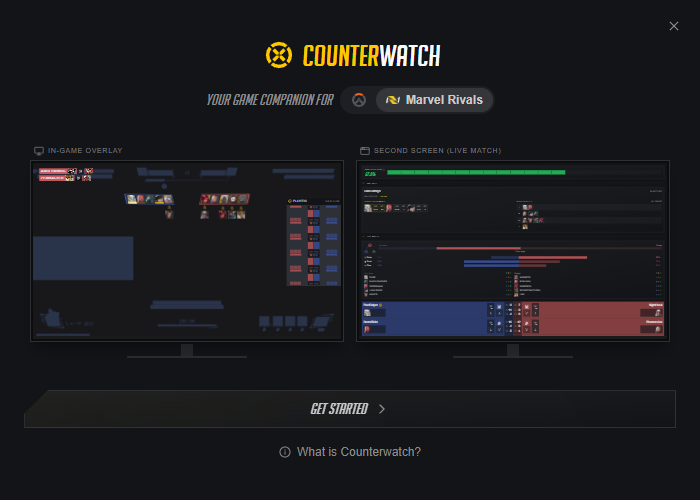
I rebuilt the onboarding experience from scratch. New users now see a live dual-monitor illustration of the app in action before choosing to sign in or start tracking as a guest. The getting started checklist got a visual refresh too, and offline alerts are cleaner across the board.
New Features
Redesigned Onboarding
- Live App Preview: New users see an animated dual-monitor illustration showing the app's overlay and launcher working together, with hero swaps and live data previews for both Overwatch and Marvel Rivals
- Clearer Entry Paths: The sign-in flow is split into two steps: first see what the app does, then choose between "Start Tracking" as a guest or "Sign In" to save stats
- Game Toggle: Switch between Overwatch and Marvel Rivals previews to see game-specific features before committing
- Back Navigation: Every screen now has a back button so you can revisit previous steps
Getting Started Checklist
- Animated Border: The checklist highlights itself with a racing gradient border on first appearance, drawing attention to your setup tasks
- Overlay Editor Guidance: The "Configure overlay" task now triggers a coach mark pointing to the overlay editor button in the toolbar, guiding you to the right place
- Overlay Editor Button Coach Mark: A new first-use tooltip highlights the overlay layout button so new users know where to find it
Improvements
Status Alerts
- Smarter Offline Alert: The "You're offline" warning now appears in the main status banner and suppresses other alerts that are just downstream effects of being offline, reducing alert clutter
Bug Fixes
- Fixed the close confirmation dialog sometimes flickering when opened during gameplay
- Fixed release channel detection incorrectly logging a warning for all users on the default channel
- Fixed a rare scenario where the app could get stuck reopening a window repeatedly if it failed to display
- Fixed the onboarding window not centering properly on dual-monitor setups