
Lots of quality-of-life polish in this one. I added a close confirmation dialog so you don't accidentally quit mid-match, made the game status banners expandable with details, and you'll now get a Windows notification when a game comes back online. Session history also got some love with hero portraits and better navigation.
New Features
Close Confirmation
- Close Confirmation During Gameplay: Closing the app while in a match now shows a confirmation dialog instead of quitting immediately. Plus subscribers can choose to minimize to tray instead. Your preference is saved in Settings under "Close button behavior"
Game Status
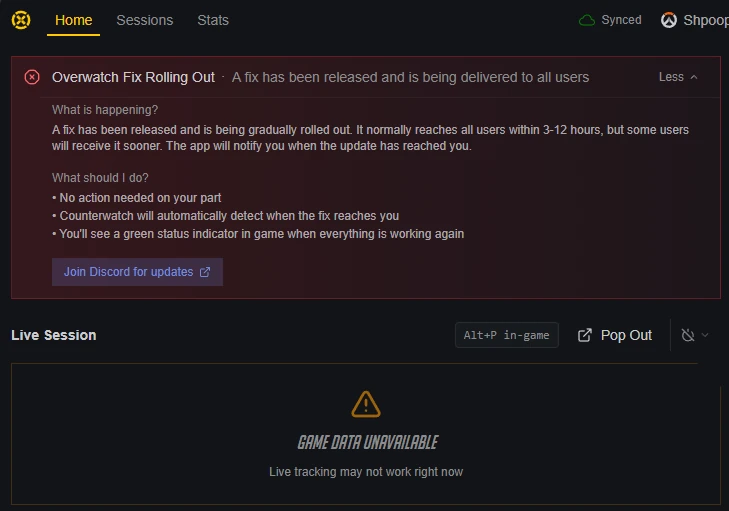
- Expandable Status Banners: When Overwatch or Marvel Rivals tracking is unavailable, you can now click "More info" to see what's happening, what you can do, and a link to the Discord server
- Recovery Notifications: Get a Windows notification when a game you track comes back online, even if the app is minimized
Improvements
Session History
- Hero Portraits on Session Cards: Hero portraits now show on collapsed session cards without needing to expand them first
- Preserved Navigation State: Clicking back from a match detail now keeps your session expanded instead of collapsing everything
Live Session
- Better Waiting Messages: Replaced the vague "Warming up..." text with clearer messaging about what's happening. When game data integration is having issues, you'll see a specific warning instead of just a spinner
Window Management
- Monitor Awareness: Desktop windows now properly move off your game monitor when a match starts, including on app startup. Closing a secondary window brings back the launcher instead of leaving you with nothing
Bug Fixes
- Fixed the update banner disappearing when navigating between pages
- Fixed duplicate alerts showing when game data is unavailable
- Fixed the last session map strip showing too many maps
- Fixed the status banner showing contradictory information when a fix is rolling out