
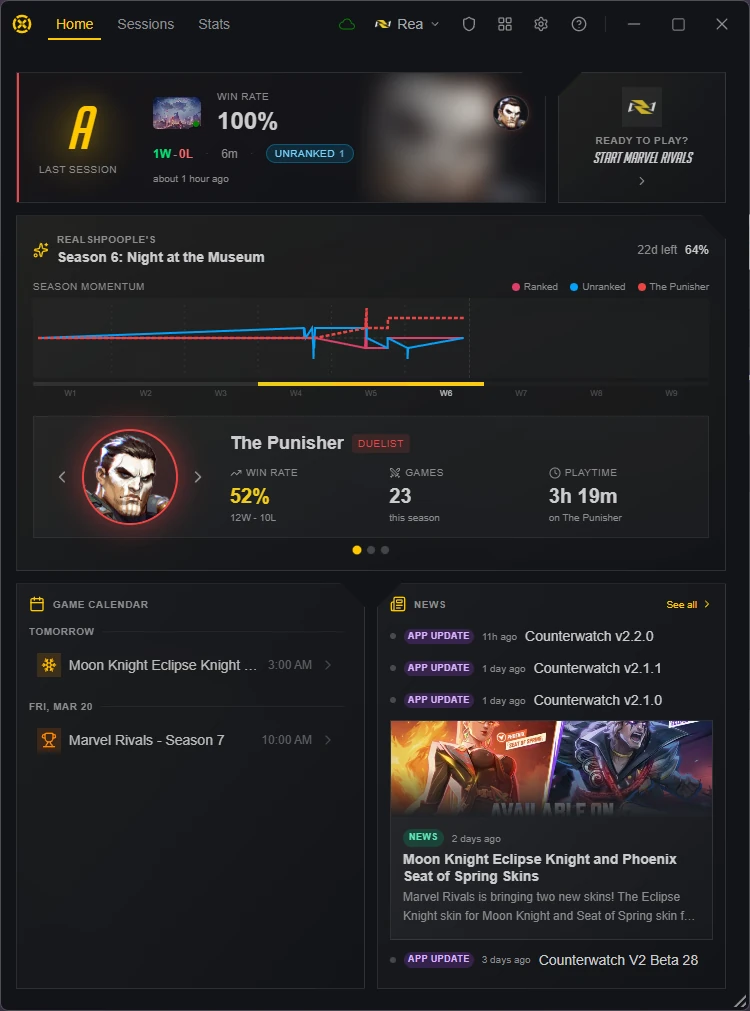
The launcher home page has been completely redesigned with a more focused layout. Instead of a single scrolling page, there are now three dedicated sections with icon rail navigation and detailed drill-down views. I also redesigned the welcome flow and improved several small details across the app.
New Features
Redesigned Launcher Home Page
- Three-Section Layout: The home page now has dedicated Home, Sessions, and Stats surfaces instead of a single scrolling page
- Icon Rail Navigation: Quickly switch between sections using the new sidebar icon rail
- Session Timeline: Browse your play sessions in a new timeline view with runtime-aware session cards
- Match Detail View: Click into any match or article for a focused detail view without leaving the launcher
- Match Popout: Pop out individual matches into their own window for side-by-side viewing
Redesigned Welcome Flow
- Two-Phase Setup: Game selection and sign-in are now split into two clear steps, making it easier to spot the sign-in option and get started
Subscriber Perks
- Hide to Tray: Minimizing to the system tray is now a subscriber-exclusive feature. Free users can still minimize windows normally, and quit behavior remains the same for everyone
Improvements
Window Toolbar
- Updated Icons: The minimize, maximize, restore, close, and settings icons have been refreshed with a cleaner, more consistent look
Bug Fixes
- Fixed in-game player icons sometimes blending into bright hero portraits
- Fixed the launcher window shrinking below its intended size when ad layout changed
- Fixed the onboarding screen sometimes appearing alongside the launcher on startup